New to the MSE Forum?
How to join, FAQs and more

The MoneySavingExpert.com Forum is a social network where users discuss bargains and consumer issues, free from people trying to sell them things.
It's an amazing place with a huge wealth of helpful info and friendly people. But remember it's open to all, content isn't officially checked out by MSE and anyone can post on it.
-
The Old Stylers who discuss everything from war-time rationing to white vinegar.
-
The Debt-free Wannabe Diarists detailing their latest triumphs in cutting their debt.
-
Bargainistas sharing the latest deals and tips on the hugely popular Grabbit board, voucher and code finds on Discount Codes 'n Vouchers and the Freebies board.
So now you've decided to join the Forum, log in and join in!
If you have your own question to ask, click through to the forum board you want to ask it on, eg, House Buying, Renting & Selling, click the bright pink 'new thread' button at the top left of the board, write your question and submit it.
If you want to join in with an existing conversation, click the 'reply' button at the bottom of the discussion thread, write your reply and submit.
If you're looking for discussions about specific subjects, our advanced search will help you. Just complete the fields as appropriate.
Remember too that forumites mustn't do anything to spoil others' enjoyment of the site. Please exercise caution, do your own research and report any post or private message (PM) that you feel is inappropriate, illegal or offensive to ForumTeam@MoneySavingExpert.com.
Please read and stick to the MSE Forum rules
We're a very friendly forum – a community of MoneySavers all here to help each other save money in a welcoming, non-judgemental environment.
To keep it friendly, we have an overarching set of Forum Rules. Please help us help you by reading them carefully before you join.
Welcome to the MSE Forum!
How to report posts, use bookmarks and change notifications
How to report posts that break the rules

Every post on the Forum has a 'Report' button in the bottom left-hand corner. To report a post, click this button to show reporting options.
Logged in users: If you believe the post is spam, you can simply click the 'Spam' option. If you think the post breaks one of our Forum Rules, click the 'Report' option.
You will then be asked to provide a reason for reporting the post with a list of options. Select the option that is closest to the rule you think has been broken.
Remember: Misusing or abusing the report button is against our rules so only report content you think breaks the rules. We may take action against accounts that repeatedly misuse the reporting system.
If you're not logged in: Email forumteam@moneysavingexpert.com specifying which post (please include a link) and stating why it breaks the Forum's rules.
How to bookmark and favourite things
You can bookmark discussions and favourite categories (or boards) on the Forum so you can always go back to your favourite stuff with ease.

The Favourite icon is in the top of every board on the right-hand side. Clicking it will add the board to your list of Favourites.

The Bookmark icon appears on all discussion pages. Clicking it will add the discussion to your bookmarks and you'll get notified when people reply (but you can turn that off in your settings if you don't want to be notified).

If the Favourite or Bookmark icons are in a solid colour, that means you have already added them to one of your lists. Clicking them again will remove that board or discussion from your list.
You can go to a list of your Favourite boards or Bookmarked discussions from the Forum homepage or the left-hand menu on any page. You can also click on these links while you're here: Favourites, Bookmarks
How to change your notification settings

There are two types of notifications you can receive from the Forum. When you are on the Forum, notifications will popup in your 'Notifications' panel (at the top right of every page).
Some notifications can also be delivered to you by email, so you don't have to be on the Forum to be notified of activity on the discussions you have started or are a part of.
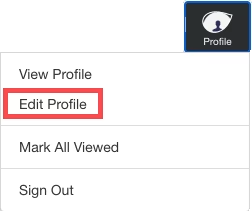
You can change how (or if) you receive each type of notification and the categories you are notified about in your Notification Preferences. To find this page on the Forum, go to 'Edit Profile' in the top right-hand menus and then navigate to Notification Preferences page in the left-hand side.
For each category of notification you can select and deselect Popup and Email notifications to suit your preference.

Make sure to click 'Save Preferences' when you have finished changing your preferences.
Share this guide?