



The Budget Planner
How to manage your money

The problem with most budgets is they don't work. While they look at a typical month's spending, what about birthdays, that dentist visit and other one-offs? This guide gives you some helpful tips and tricks and includes a free Budget Planner, which analyses your finances to help you manage and control your cash.

How to use our Budget Planner tool
Our Budget Planner is based on rock-solid budgeting theory, accurately mapping your incomings and outgoings over a year, then helping assess whether it balances. We've a summary below on how to get started:
1. Gather bank statements, household/utilities bills and receipts. Lay the groundwork for a monthly budget by compiling these financial records, as well as info on credit card debt, pension contributions and one-off spends.
2. Fill in the free BUDGET PLANNER spreadsheet. Be 100% honest when filling in your answers – remember it's better to guess larger than smaller. Our free Budget Planner spreadsheet is both downloadable and printable.
3. Got an overspend? It's time to reduce your spending through pain-free savings (cutting bills without cutting back) – think credit cards, broadband, childcare, council tax, etc. If that's not enough, try painful savings – essentially, making lifestyle changes (our Spending Demotivator tool could help here).
4. Need some help sticking to your personal budget? Use our 'piggybanking' technique. This is effectively dividing your money into different pots, each dedicated to a different type of expenditure (like groceries, birthday presents). That way you'll know exactly how much you have to spend depending on the occasion or scenario.
Why is budgeting important?

For many people, budgeting is more crucial than ever before. With household budgets squeezed as a result of higher cost of living from the wider economic climate – where everything from rent and mortgage payments, food shopping, energy bills and petrol prices have increased – a budget can be an essential part of managing your finances and helping you save money.
When done correctly, a budget is a very precise tool for analysing your finances. It answers two key questions...
1. Do I spend more than I earn?
An instinctive assessment is easy – if you're eating up your savings or building up debts, you're likely to be overspending. Yet before you can address this, it's important to get an accurate idea of the size and scale of the problem.
It may not seem fun to track expenses, but major overspending can lead to a debt spiral and severe problems, that's why the Budget Planner is designed to give you a definitive assessment of your finances and where your money goes.
2. What can I afford to spend?
Once you know where your money is going, you can start to alter and prioritise what you do with your money to enable you to stick within your means. You'll better understand whether you could be putting money aside into a savings account to save for a big purchase, for example, or whether you need a plan in place to deal with debt.
While the Budget Planner includes ways to enable you to work out how to prioritise within your means, the real difficulty is sticking to it. The piggybank technique is designed to help you do just that.
Before you start, read the following six tips to help you fill in the free Budget Planner spreadsheet below.
1. Gather together all bank statements, household bills and receipts
Don't be tempted to guess or estimate. The success of a budget for money management relies on accurate incomings and outgoings and the only way you can be 100% sure is by getting all your bank statements and household bills in front of you in black and white.
Also, while getting an idea of monthly spend is great, I recommend at least three months' worth of bills and receipts so you can keep track of all your quarterly expenses, such as your TV licence or water bills.
2. Decide who your budget is for
It's very important to be consistent when budgeting. First decide who you're filling it out for – is it just for you and your personal finances, or is it for your partner/family too? Finances often can't be separated, in which case you should sit down and do it together.
3. Be as accurate as possible with your figures
It's tempting to try to fool yourself by underestimating your expenditure. This is a MoneySaving sin... and you will be punished. Try to be accurate, and, if you're not sure, guess larger not smaller – that way you'll have cash left over and not be short.
Some types of spending overlap into different groups, so be careful not to count expenditure twice. For example, if you've included your car insurance in the motoring section, don't include it again under insurance.
4. Distinguish between credit card 'debt' and 'spending'
The credit card section is designed for you to enter the cost of repaying your existing credit card debts. Don't confuse this with spending, where you simply use your credit card and pay it off IN FULL.
The best way to explain this is with an example. Say you spend £500 each month on food shopping using your credit card, but then pay off your bill in full. This spending belongs in the food shopping column and not in the credit card column as, otherwise, you'll be counting it twice.
5. Check your pension details
If you contribute to pensions by cheque or have a payment from your bank account each month, it should come under the expenditure section.
However, if your pension comes straight out of your salary as a payroll payment, don't include it as when you fill in the income section, you should just fill in the net amount of pay you receive after all deductions.
6. Don't forget to include 'one-off' spends
Whether it's a holiday, car or special birthday treat, we all have one-off spends that can affect our budget planning. The MoneySaving way of accounting for these is to apportion the annual cost of these into monthly amounts. So let's say your new car costs £2,000 – over a year, that's £166.66 per month. So you'd put £167 under "new car" each month.
Another top tip is to remember that when you do include one-offs, such as holidays, don't forget to subtract any regular spending. For example, say you normally spend £100 per week on food shopping and £30 on petrol, if you're abroad for the week, you won't spend this, so make sure your budget reflects this.
What's different about my budgeting technique?
It's often said "In debt? Do a budget!", "Skint? Draw up a budget!", "Need to save for something big? (ie car, wedding, baby on the way) BUDGET!" Yet while budgeting is seen as a solution, unfortunately most budgets are worthless.
The main problem is that because they concentrate on a typical month, they massively underestimate your real spend, as this misses huge costs such as Christmas, summer holidays, new sofas or getting a new car.
Broad categories like "motoring" make it too easy to forget the small expenditures that add up. Instead, "motoring" should cover MOTs, new tyres, petrol, insurance, breakdown cover and more. Hopefully the Budget Planner counters that by having nearly 100 separate categories.
The free Budget Planner spreadsheet
It's always surprising to see quite how many things you spend on. Worse still is how much you spend on them. Even though you may not like the end result, it's really important you're 100% honest when filling in your answers – remember it's better to guess larger than smaller to give yourself a bit of a buffer.
FREE Budget Planner spreadsheet

To help you budget I've got a free spreadsheet where you can detail all your income and outgoings.
Download Budget Planner for Excel
If you spot any inaccuracies, or something's not quite working, let us know at brokenlink@moneysavingexpert.com
MoneySave as you go!
Are you getting the best value for money? Can you cut costs? The Money Makeover will help.
What your result really means...

Well done you!
Providing you've been honest with yourself, it's time to relax a little – but MoneySaving doesn't stop there. In fact, it's just the beginning. Paying less for things means you have more money in your pocket to enjoy life more (and possibly set some financial goals and save some for the future too!).
Savings from doing this could be £3,000 – £5,000 a year. My estimate is it'll take a full day's work... but look at the return. It'll be the best paid work you've ever done. The whole MoneySavingExpert site is dedicated to doing this in every area of your lifestyle, but to get started, read the Money Makeover article.

Don't run the risk of a debt spiral – sort it now!
Spending more than you earn may not seem like a big deal, yet it's a potential disaster – and not just financially. At best, you're eroding your savings; at worst, you'll need to borrow.
Such borrowing is also the worst, as it means you can't afford your lifestyle and thus there's no planning to the debt and no end in sight. Sadly, I've seen this result in debt crisis too many times, and that doesn't just hit your pocket – it can hurt your home, family, mental health and relationships.
What is a 'debt spiral' and why does it matter?
A debt spiral is where you experience ever-increasing levels of debt which you have no ability to repay. If you consistently spend more than you earn and need to borrow to cover your costs, you run the risk of being in a debt spiral. It works like this:
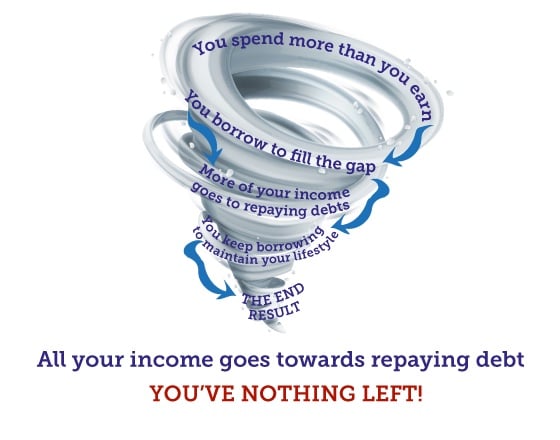
Many people fool themselves about this, thinking: "This won't happen to nice families like us". Well, I'm afraid even if you're middle class, you're not insulated from debt. In fact, you're in the prime category for debt crisis. It's crucial to take the blinkers off. Far too many people in work with good salaries have big debts.
A good rule of thumb is this – if your non-mortgage debts exceed half your after-tax salary, you have a real issue.
This isn't over-dramatising. When there's no money left and you can't borrow more, and the creditors are asking for money back which you've no ability to repay, it touches every element of your life.
What to do if you've got an overspend...
I've got a number of simple steps to go through to try to reduce the amount you're overspending.
Step 1: Pain-free savings – cut bills without cutting back

This is about ensuring you live the same way, but pay less to do so. It's pain-free, as no lifestyle changes are needed.
Don't just look at the obvious things like credit cards, broadband and mortgages. You can save on things like childcare, council tax and your supermarket shopping too. To go through this in detail, use the full step-by-step Money Makeover guide, which shows you how to look at everything.
Step 2: Rebudget with what you expect to save
Now, it's worth revisiting your Budget Planner, incorporating your new predicted expenditure based on the expected pain-free savings. What you do next depends on the result...
Are you currently spending within your means? Congrats, no more change needed (unless you're saving up for something), but keep monitoring your finances. Effective budgeting is still worthwhile. See piggybanking.
Still spending more than you earn? Then it's time for step 3...
Step 3: Painful savings – cutting back
You need to spend less, do less and sell things until you're living within your means. We've got more detailed guidance in Debt problems & help available.
Start small. Easy lifestyle changes make huge differences, check out The Demotivator to see the real impact of small spending changes. Cutting out your £3 weekday coffee could reduce your annual expenditure by more than £1,000. Add newspapers, magazines, cigarettes, chocolate, parking and more, and savings mount rapidly.
Ask yourself two questions for every aspect of your life:
1. Do I need it?
2. If I do, could I do it more cheaply?
This may mean having the self-discipline to cut out cinema trips and expensive Christmases, half-compromises like switching Sky for Freeview, or stopping costly holidays abroad in favour of holidaying at home. See the Stop Spending guide for full help.
Don't be afraid to sell things. If you're asset rich but income poor, then consider flogging things you don't use or need. Of course these sales are one-offs, but hopefully you can use the money to repay debts or get your savings back together.
It could include selling things like a car or motorbike, working through your wardrobe and getting shot of old clothes (see the eBay Sellers guide), or selling old mobiles. If you've got it and don't use it, consider flogging it.
Are your debts severe?
If things are so grave that even this doesn't touch the sides, you're likely in serious debt and need urgent guidance. Visit free non-profit debt crisis agencies like Citizens Advice Bureau, StepChange Debt Charity or National Debtline quickly.
Boost your budgeting success by piggybanking
Doing a budget on paper is easy, the difficult bit is sticking to it. That takes either strong discipline or a decent technique. I can't help you with the first, but I have a simple yet powerful method to help you take control of your spending. It's called piggybanking.
There are two key facts you need to understand before you start to budget properly.
1. You can't trust your bank account
Your bank account lies. When you check it, it shows you a simple snapshot of the scene that day. Less obvious is what payments are due in or out and when direct debits are paid, let alone when you need to go shopping. Never think that having cash in your bank account means your budget is balanced. By contrast, being overdrawn is definitely a good indicator that it isn't.
These days a lot of banks do have basic monthly budgeting systems available that work out what you're likely to have left to spend after you've paid your expected bills. This is better than nothing, but still doesn't provide the full picture. These tools only look at a typical month and don't take into account one-off expenses or long-term savings goals. If you only rely on this for your budgeting, you're going to end up overestimating how much you can comfortably spend.
2. Don't ask: 'What's the cheapest way?' Ask: 'What can I afford?'
To get back on track, your finances must lead your lifestyle, not vice-versa. Many people look for the cheapest way to do something, and consider that to be MoneySaving. Yet if you're overspending, it's more important to curtail that – meaning that you're spending within your means.
Let me clarify this with an example. People often get themselves into trouble at Christmas time by asking: "How do I have a great time, with a big tree, all the family round for dinner and hi-tech prezzies for all the kids on the cheap?"
This is a bad question. It establishes your priorities without reference to how much money you've got. The right question to ask is: "What can I afford to spend this Christmas?", and then plan your activities around that.
What is the piggybanking technique?

The piggybanking technique helps you automate your spending so you always know how much money you can truly spend.
It's easy to do:
Step 1: Select your main categories of spending
The aim is to have your books balancing – so you're not spending more than you earn. To do that, you need to work out how much you can spend on different areas of your life. You can use the "Part C – Monthly desired spend" column of the Budget Planner to do this.
Once that's done, you need to scan through to see what the major categories are. This could be holidays, wedding saving, Christmas, clothes, birthdays, hobbies or whatever you spend on. If you're self-employed, you should always have a tax account.
Step 2: Arrange your piggies
Now you know how much money you want to spend on different items, the aim is to make it as simple as possible to know how much cash you have available.
There are a few ways to do this. It used to be you'd have to set up a couple of different bank accounts, one for each of your categories, so the money's effectively in little pots (almost as if you're putting them in different piggybanks). For example, to help with your savings goals you could have a main bank account, a bills account, then accounts for holidays, Christmas, and emergencies.
However, many current accounts now offer simpler and quicker ways to split money into different pots that can be easily managed in one place, either via an app, or online. So you don't need to worry about having lots of bank accounts with different providers. Three providers stand out:
Chase* lets you split money into separate saver accounts, each with its own individual account number - so you can choose which account each regular payment goes into, and out of. Newbies also get a variable interest rate of 4.5% for one year on savings (2.25% variable + 2.25% fixed bonus for 12 months) – currently among top savings rates. Chase also offers a range of opt-in rewards such as an ongoing 2% cashback on everyday spending and 5% AER interest on 'rounded-up' savings.
Monzo lets you create 'pots' categorised with different names, and you can arrange for your salary to be divided up automatically between each pot. You can also pay bills from specific pots too. Rates are currently from 2.75% for easy-access pots.
Starling also lets you set up 'spaces' and automatically send a portion of your salary in to each space. You can then choose which bills come from each space.
These are just three of the many new options for piggybank-friendly accounts - traditional banks will often let you open other 'savings' accounts (paying little or no interest) and let you easily set up standing orders between them. Explore the full best bank accounts guide to find the right option for you.
Bonus tip: for the piggies you're only likely to access once a year, for example, holiday or Christmas piggies, it's worth using a savings account so that you're accumulating interest on the money you're putting in there. Our Top Savings Accounts guide will point you in the direction of the best options for this.
Step 3: Use a standing order to feed the piggies
Now you've divided your money into separate pots, either by setting up separate bank accounts, or by using an online platform or app, it's time to feed each of the piggybanks – including the bills account, which you should always overestimate slightly – from your main account. Set up standing orders to shift the right amount of cash each and every month.
As an example, if you allocated £800 a year to spend on Christmas (the typical amount for a UK family), you would put £67 a month into a Christmas account each month, so it builds over the year.
Tip: Schedule this for two days after getting paid, not for the same day – just to give you a little bit of room in case there are any payment problems.
The result: Now your bank account(s) tell the whole truth
Now, when you look in your main account, you know it really shows how much you have to spend, as all the money for bills and other key areas has been shifted out.
Plus, if you see a £700 holiday, but there's only £400 in your holiday account, you now KNOW you can't afford it and can cut your cloth accordingly.
Once you've piggybanked, you can spend the leftovers
If you've piggybanked properly, putting aside all the cash you need for bills and essentials, you're free to spend whatever is left in your main bank account each month. You really know how much money you have to spend at Christmas or to go on your holiday – there's no fooling yourself anymore.
Important: It's possible the end result of this is you can't afford the holiday you wanted. But more importantly, you won't spend what you can't afford and wind up in the debt spiral.
Share this guide?