





Credit card statements explained
How to read your statement and avoid fees

If you're new to credit cards, understanding your statement can be confusing. Here, we explain what a credit card statement is, the key information to check and how to avoid unnecessary interest, fees and charges.

First, a quick overview of credit card statements
Your statement is your monthly bill. It shows what you owed when the statement was produced, the minimum repayment and the payment due date.
Pay the statement balance in full if you can. This is usually the best way to avoid interest on purchases. Paying only the minimum can keep you in debt for longer.
Don’t confuse your statement balance with your current balance. Your current balance may include newer spending since the statement was produced, which will usually appear on your next bill.
Use your banking app between statements. Your statement is a monthly snapshot, but your banking app or online account will usually show a more up-to-date balance, recent transactions and available credit.
Act quickly if something looks wrong. Check unfamiliar retailer names and receipts and contact your card provider promptly if you don’t recognise a transaction.
In the right place?
- New to credit cards? See our A beginner's guide to credit cards guide.
- Struggling to repay your card? See our Debt help guide.
- Paying interest on existing card debt? See our Balance transfer credit cards guide.
What is a credit card statement?
A credit card statement is a monthly summary of your credit card activity. It shows what you’ve spent in the billing period, what you owe, the minimum repayment and the date it must be paid by.
Credit card statements are usually sent by post or available in your provider’s app or online account. Most providers let you opt in to 'paperless' communications in your account settings.
Always check your credit card statement carefully.
It can be easy to overspend on a credit card. Unlike with a debit card, the money does not leave your bank account at the point of purchase, so if you're not tracking your spending, debt can quickly build. Checking it each month helps you keep on top of what you owe and avoid surprises...
-
Avoid missing the payment due date. Your statement shows when the minimum repayment is due. It's best to set up a Direct Debit so you never miss a payment. If you do miss one, you could pay extra fees, and possibly lose any promotional deal (such as a 0% balance transfer or 0% spending deal).
-
Spot incorrect charges. Check for payments you don't recognise, duplicate charges or refunds that have not appeared.
Remember that your statement is an important monthly snapshot, it won't always show the most up-to-date picture of your account. To keep closer track between statements, use your provider’s app or online account to check recent transactions, your current balance and available credit.
How to read your credit card statement
Each provider will lay out their credit card statements slightly differently, but all should contain the same key information you need to ensure you pay what you owe on time and avoid unnecessary fees and interest.
1. Check your statement balance, minimum payment & due date
Your account summary should show how much you owe and when you need to pay it by, as well as any charges that have been added. It's also a good idea to understand how much of your credit limit you have remaining.
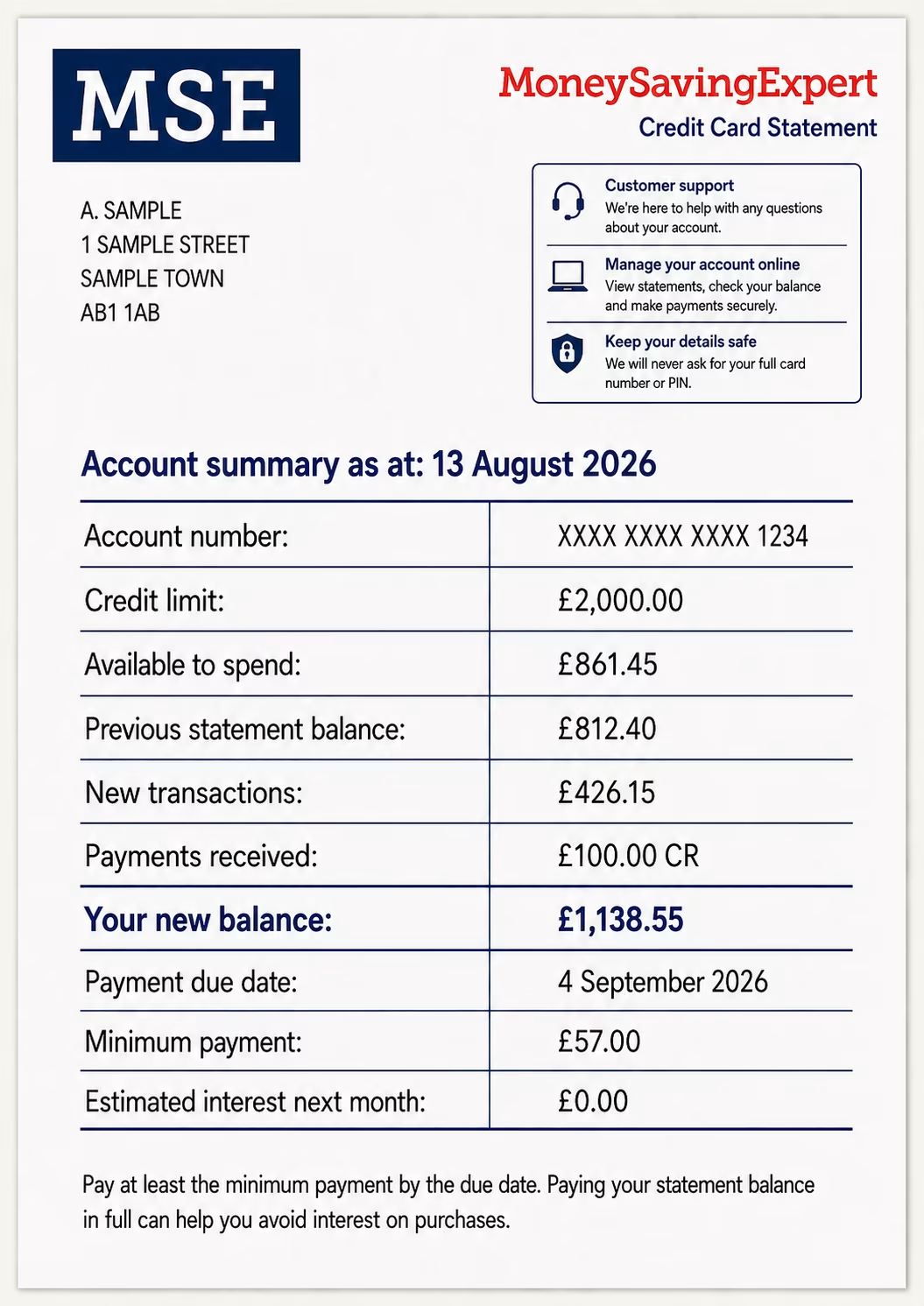
Credit limit – the maximum amount you can spend on your card.
Available credit – how much of your credit limit remains.
Transactions during this period – includes purchases, payments, refunds, charges and cash withdrawals.
Payments received – this is what you have paid to your card provider since your last statement.
Statement balance – what you owed when the bill was produced. If you can repay this IN FULL each month, you won't pay any interest.
Minimum payment and due date – the least you must pay, and when it needs to reach the card provider. If you only pay this amount, you will pay (expensive) interest.
2. Check every transaction carefully to spot errors.
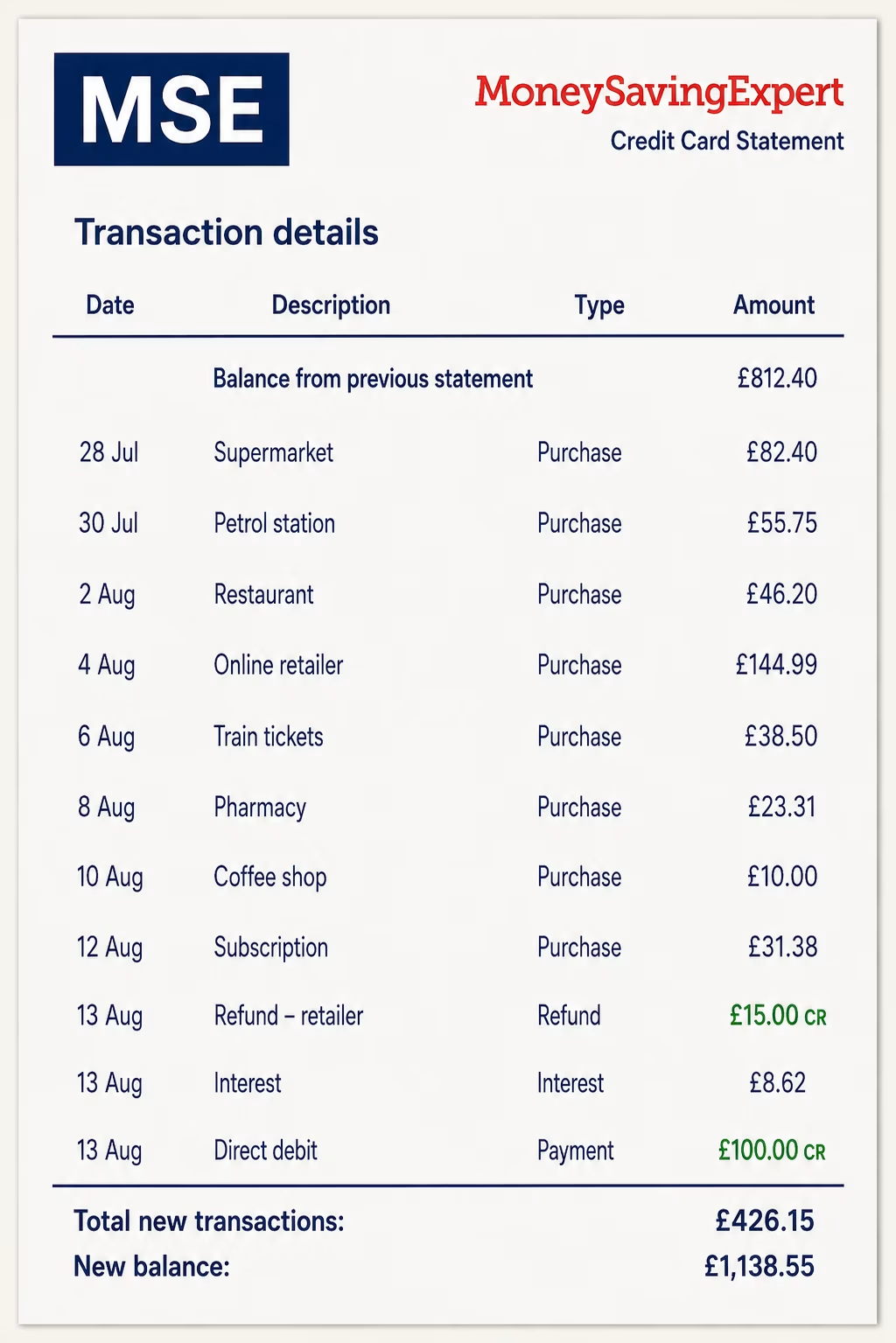
The main section of your credit card statement is an itemised list of your transactions since your last statement. Check this thoroughly.
If you're unsure about a payment, remember that retailers sometimes have unfamiliar trading names. Check receipts if possible before contacting your credit card provider.
Don’t just check purchases. Look at payments, refunds and credits too, as these should all be reflected in your transactions.
If a refund is missing, you’ve been charged twice or a payment still doesn’t look right after checking your records, see what to do if you spot a problem on your statement.
3. Check interest, fees and promotional rates
Your statement should show if you’ve been charged any interest or fees, so check this section carefully. For more details, see our Credit card charges guide, but look out for:
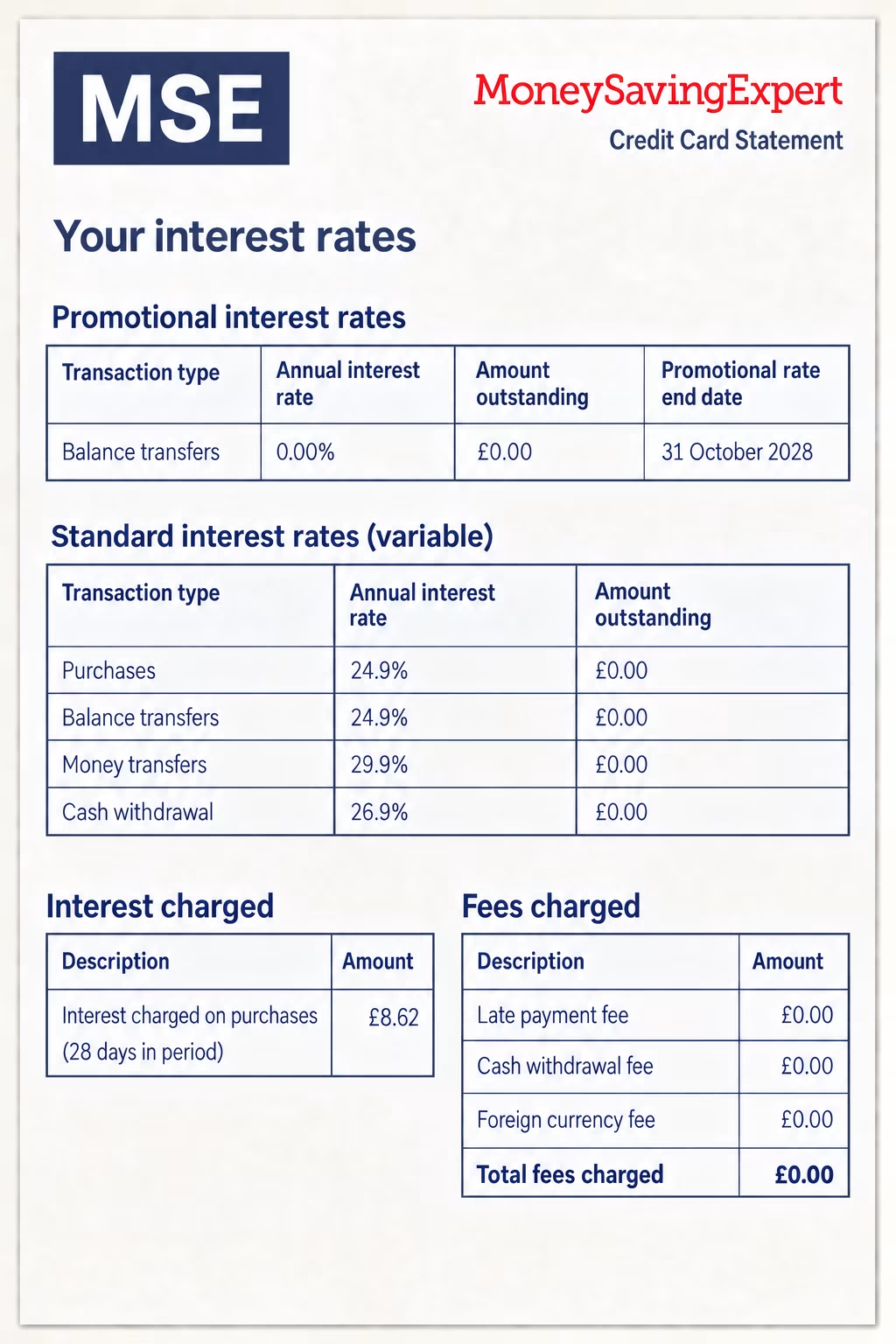
Promotional rate end dates. If you’re on a 0% purchase or balance transfer deal, check when it ends. Once it does, any remaining balance and new eligible spending will usually be charged at the card’s standard rate.
Standard interest rates. Different transaction types can incur different APRs, for example spending and cash withdrawals, so make sure you understand which rate applies for each.
Interest charged. This is the cost of borrowing on your card. You can usually avoid interest on purchases by paying your statement balance IN FULL by the due date.
Fees charged. These could include late payment fees, cash withdrawal fees, balance transfer fees, or fees for using your card overseas.
Statement date, payment due date, balances and billing cycles explained
Some of the terms on your credit card statement can be confusing, so we'll try to simplify the jargon...
What is a billing cycle?
Your billing cycle is the period of spending covered by your statement, usually about a month. For example, if your billing cycle runs from 24 April to 23 May, your statement will show the transactions you made during that period. Spending after 23 May will usually appear on your next statement.
Statement balance vs current balance
Statement balance: This is the amount you owed when your statement was produced.
Current balance: This is the amount you owe now, including any spending, payments, refunds, interest or fees added since the statement date.
Confusion can arise as your current balance will keep increasing if you keep using your card after your statement has been issued.
But you don't usually need to pay this newer spending straight away – you only need to pay the statement balance shown on your bill (well, AT LEAST the minimum repayment amount) by the due date. Anything you spend after the statement date will usually appear on your next statement.
Statement date vs payment due date
Credit card providers have a legal requirement to send you your credit card statement at least 21 days before your payment due date. This is usually referred to as a 'grace period' and is often between 21 and 25 days.
Statement date: This is the date your credit card statement is produced. It usually marks the end of that month’s billing cycle. Any spending after this date will usually appear on your next statement. It's usually 31 days.
Payment due date: This is the date by which your provider must receive at least your minimum repayment. If you miss this deadline, you could be charged a late payment fee and it may affect your credit file. It's often 25 days after the statement date.
The 56-day interest-free grace period explained...
This means you can have a maximum of 56 days interest-free between making a purchase and making a repayment – if you make a purchase on day one of a new billing cycle you'll get the entire 31-day billing period, plus the 25-day grace period, before needing to make a repayment.
However, you MUST repay your balance IN FULL EACH MONTH – leave even £1 unpaid and you'll be charged interest on the ENTIRE month's balance.
What if I don't make the minimum repayment on time?
If you don't make the minimum repayment by the due date, your card provider can charge a late payment fee and record it as a missed payment on your credit file, which will negatively affect your credit file and could make it hard to get credit in future. You may also lose any 0% purchase or balance transfer deal, meaning interest could start being charged at the card’s standard rate.
Avoid repaying just the monthly minimum amount – it'll keep you in debt for longer and mean you pay more interest overall. To see how long it would take you to clear your debt if you just paid the minimum, see our Credit card minimum repayment calculator.
If you’re struggling to keep up, contact your card provider as soon as possible. It may be able to offer support, such as an affordable repayment plan or reducing or freezing interest. For more support, see our Persistent debt help guide and our Debt crisis help guide.
Spotted a problem? Here's what you should do...
If you spot an error on your statement such as a payment you didn't make or a refund that's not gone through, it's important you act quickly – this could mean contacting your provider, contacting the retailer or raising a Section 75 or chargeback claim.
What to do if you don't recognise a transaction
If you don't recognise a transaction on your statement, you should think carefully about your spending to try and identify the purchase. It can be helpful to:
-
Check receipts, emails and app notifications.
-
Check whether the retailer operates under a different trading name (your bank's online list of common retailers can help here).
-
Check whether an additional cardholder made the payment.
If you still can't account for the transaction, you could have been the victim of card fraud. You should contact your credit card provider as soon as possible.
What if I recognise the transaction but something's wrong?
If you recognise the retailer but the amount looks wrong, you've been charged twice or a refund has not appeared, contact the retailer first. It may be able to correct the charge or process the refund more quickly.
If the retailer can’t or won’t put things right, contact your card provider. It may be able to raise a Section 75 claim.
If the problem is with your credit card account itself – for example, a fee or interest charge looks wrong, your payment has not been applied properly, or your statement was sent to the wrong address – contact your card provider directly and ask it to investigate.
Credit card statement FAQs
Can I change my credit card payment due date?
Many providers let you change your credit card payment due date, though it may also affect when future statements are produced. Setting your payment date just after payday can make it easier to budget, but check with your provider when the change will take effect.
What does CR or a minus mean on a credit card statement?
CR usually means credit. A minus figure or credit balance normally means your card account is in credit, often because of a refund or overpayment. This usually means the card provider owes you money, which you may be able to spend down or ask to have refunded.
Should I pay the statement balance or current balance?
To clear that month’s bill, you usually only need to pay the statement balance by the payment due date. Your current balance includes any newer spending, payments, refunds, interest or fees added since your statement was produced.
What do the different APRs on my credit card statement mean?
Your statement may show different APRs for different types of borrowing. For example, purchases, balance transfers and cash withdrawals can all have different interest rates. Cash withdrawals can also attract interest straightaway, so check your statement and card terms carefully.
Share this guide?