



Mobile broadband
Get a cheap mobile broadband deal for data on the move

Mobile broadband best buys
Do you really need mobile broadband?

There are three ways to get internet access when you're out and about: via mobile broadband, Wi-Fi hotspots – which you can often find for free – or tethering through your mobile.
Mobile broadband
This uses your network provider's 3G or 4G mobile signal to get you online. It requires a Sim card which commonly plugs directly into a tablet, or alternatively either a wireless hotspot device, compatible router or a USB dongle – see more info below.
Much like a phone plan, you'll usually pay a monthly fee for a set allowance of data. Pay-as-you-go deals are also available, but they tend to be pricey.
Wi-Fi hotspots
You'll find Wi-Fi hotspots for accessing the internet dotted around most towns and cities, at cafes and restaurants, bars, shopping centres and even some supermarkets. These tend to be public hotspots that anyone can join (under certain conditions) and are often free.

These hotspots might be free but they have their drawbacks:
You can't find them everywhere. Some places inevitably won't have a hotspot. Many trains don't, for example (or if they do, it's likely to be in first class or can be very expensive). Also, if you're moving from place to place, you'll have to keep connecting to a new hotspot, which can be time consuming and disruptive. Some of the main network operators also operate wi-fi hotspots. Providers like O2 and Virgin Media will show you where their nearest hotspots are if you download their smartphone app.
Most require you to register. While access may be free, you'll still have to sign up to access most hotspots.
There are restrictions. Often hotspots will have restrictions on how long you can use them and what you can use them for. Certain websites may be blocked, for example, and downloading via one may prove difficult.
With BT Broadband or BT Mobile?
If you're with BT for either its broadband or mobile, you get free access to its expansive wi-fi network - with more than 5 million BT Wi-Fi hotspots. You can find your nearest hotspot using its Find a hotspot page. To access, search for any Wifi connections that are named either BTWi-fi or _BTWi-fi in your list of available networks. To access, log in to hotspots using your BT ID. Or to get online even faster, download the BT Wi-Fi app and it'll connect you to a hotspot whenever you're in range.
Tethering
There's also a third way to get online from your tablet or laptop – by sharing your phone's data to your laptop or tablet, a process known as 'tethering' Consider this before stumping up extra for mobile broadband.
Even if you do have mobile broadband or plan to tether, try to use free hotspots where they're available to save your allowance for when you really need it.

10 mobile broadband need-to-knows
Here's what to consider when you're looking at taking out a mobile broadband subscription.
You'll need the right hardware
Depending on the type of device you want data on, you'll need different hardware. There are three ways to get mobile broadband:
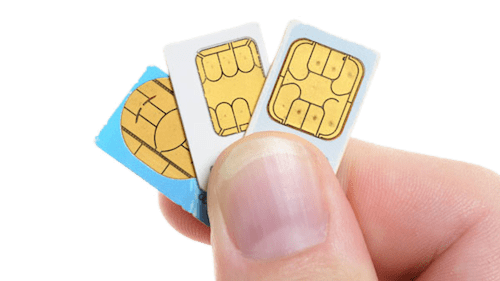
A data Sim – if you've already got a 3G or 4G-enabled device.
If your tablet or laptop has a Sim card slot (ie, it's 3G or 4G-capable), you can buy what's known as a data Sim to pop in. "Cellular" iPads and Google Chromebooks, for example, have Sim card slots.
A data Sim is all you'll need if you've got a particular device you want internet on (though for sharing your connection with other devices, you'll also need a wireless hotspot device to put the Sim into).
Many networks offer these Sims – just select the plan that's most appropriate for you, much like you would with a mobile phone tariff. For the best deals, see our Data Sim top picks.

A mobile hotspot device – for connecting multiple devices at once
You'll need a device to create a wireless hotspot if you want to do this. These are known as mobile Wi-Fi, or Mi-Fi, devices, and they usually have a slot for putting a data Sim into.
Networks often bundle these devices with mobile broadband plans (see Wi-Fi device best buys), whereby you'll be provided with a Sim to slot in. These plans can make them more affordable – although on shorter-term rolling contracts you'll usually have to pay extra for one.
Alternatively, sometimes it can be cheaper to buy one standalone from a retailer and combine it with your own Sim – just make sure it's 4G-enabled if you get 4G on your plan, as some are only 3G-ready.

A USB dongle – if you just want internet on your laptop
It's also possible to get a USB dongle into which to put a Sim. While perhaps not as convenient as a wireless hotspot device, they tend to be a little cheaper and are perfect if you just want to surf on your laptop.
Dongles also run off your laptop's battery. While this might drain your laptop's battery a little more, as you won't need Wi-Fi switched on to use it, it should save a little juice compared with connecting via a hotspot.
As with Mi-Fi devices, you can get dongles either bundled as part of a plan (provided with a Sim to insert), or separately for combining with your own Sim.
Quick Question
-
Can I use my phone's Sim card in my tablet/laptop/dongle and vice versa? Smartphone Sims have a mobile number attached to them – they aren't technically intended for other devices, but sometimes they will still work in them. Equally, sometimes a data Sim won't work in a smartphone.
O2 and Three have told us their Sims aren't cross-compatible, so you won't be able to switch them between tablet/dongles and smartphones. Vodafone, EE, Smarty and Giffgaff, on the other hand, say their Sims will work across multiple devices, but you may need to change the Access Point Name (APN) settings – check with your network how to do this.
If you want to share the data on your mobile plan with another device and you can't switch the Sim over, you can tether them to each other (which is often easier anyway)
Your device may need to be unlocked to work
Most tablets will come unlocked, meaning a Sim from any network will work in them. However, wireless hotspot devices and USB dongles are often locked to a specific network. As with smartphones, some of the networks may unlock the device for you at a cost, but this isn't a dead cert and it can be expensive.
With some devices, and wireless hotspot devices in particular, you can buy a code that will allow you to unlock it. Search for your device's name on eBay alongside the term "unlock code" – for many you can buy a code for £1 or £2. When ordering, you'll usually be asked for the 15-digit 'IMEI' number, which can be found relatively easily.
Depending on your hardware, you'll either be able to directly input the code, or you may have to do it via computer using specialist software. Follow the device-specific instructions that will be sent with your code.
Again, this isn't possible with all devices, but it can be an inexpensive way to give you the freedom to choose your plan.
Check your coverage before signing up
To make sure you'll get decent coverage, before you take out a plan, consider where you're most likely to be using the service. It might even be worth getting a cheap pay-as-you-go Sim from the network so you can test the signal before committing.
There are four core mobile networks in the UK: EE, O2, Three and Vodafone. All other operators that offer 3G or 4G services 'piggyback' on one of these, essentially meaning they run off their network (ie, they don't provide their own signal). We've a full list of which firms piggyback on which providers – check the relevant network's coverage map before signing up.

Network coverage checkers
The networks can sometimes be generous with estimations of their coverage though, so it's worth checking Ofcom's coverage map too.
Watch out for download limits

Like most smartphone (and some home broadband) tariffs, mobile broadband providers may limit the amount you're allowed to download each month. Go over this limit and you could be liable for extra charges (see table at point 8). Most networks will let you check your remaining allowance either online or through a smartphone/tablet app.
In practical terms, 1GB should be enough if all you do is browse the web and check emails, but if you plan to download and/or stream music and video, it's likely you'll need more.
If you don't commit to a contract, you'll usually pay more upfront
As with smartphone Sim-only plans, if you take a rolling contract with only a 30-day commitment, your monthly payments may end up higher for the same allowance. Consider whether you're willing to sign up for longer for the saving – or try it out on a short-term basis at first before committing.
If you go for a plan that comes with a wireless hotspot device or USB dongle, you'll very likely need to pay something upfront for the device if you take out a rolling contract. Often the device will be free, or at least much cheaper, on a 12-month contract.
Using it abroad can cost BIG

If you use your tablet or laptop dongle abroad, you need to be careful. As with most smartphone plans, most mobile broadband packages can cost a fortune, even for a small amount of use abroad (see Cheap Mobile Roaming for full info).
The EU's cap on roaming has gone a long way to reducing the cost of using data abroad in Europe, but it still costs up to 4.4p/MB on the major UK networks – that's just four emails without attachments! If you're outside the EU, the cost skyrockets, to as much as £8/MB in some cases.
If you need to access data abroad, it's generally better to pick up a prepaid data Sim before you go.
Existing customers may be able to haggle

Existing mobile phone or home broadband customers can sometimes get special deals on mobile broadband packages, by tacking them on to their existing plans.
These types of discounts aren't an absolute certainty by any means, and where they do exist they tend to vary depending on your provider and what services you currently take.
First find what deals are available for new customers online, and then call up your existing provider and see if it can beat the best (existing customer deals can't usually be found online). You may be able to blag yourself more data or shave a few pounds off the monthly cost – just give it a go and haggle your heart out.
Consider tethering through your smartphone

Many mobile tariffs will let you share your data to use on other devices. This practice is known as tethering, and in effect it turns your smartphone into a mobile hotspot device or a USB dongle.
On the iPhone, it's termed Personal Hotspot – there's a useful guide to using it on Apple's website. The process varies from model to model on Android, but for a basic step-by-step, see this WikiHow guide.
For light data users, tethering can replace the need for a dedicated mobile broadband plan – but remember the data you use when tethering will count against your monthly allowance on your phone contract. What's more, if you're tethering to a larger-screened device or a laptop, you'll be viewing larger web pages with more data-heavy content, meaning you're likely to burn through your data allowance faster.
Most major networks allow you to tether and use your data in the same way you can on your mobile, but some put restrictions or qualifications on its use.
Quick question:
What happens If I exceed my data allowance. Going over your monthly data limit has the same impact whether you're tethering or just using your phone – in order to use more data you'll either have to pay a per-MB rate or purchase an add-on or bundle of additional data.
To curb any unexpected spending, you can ask your provider to set a bill cap over your usual monthly amount, essentially a limit you're prepared to pay for an extras – these usually range from £0 to £30.
Minimise data usage
Virtually all mobile broadband plans come with a limited data allowance, so it's important to conserve it where possible. Try to match your plan as closely as possible to your estimated usage.
If you're on the go, your first port of call should be to use free Wi-Fi hotspots where possible. If you know you'll want to download a larger file in advance, do it through your home broadband connection instead before going out. When you don't have access to Wi-Fi or it's just not convenient to use, though, you can still reduce your data usage in other ways.
Tips to minimise data usage
-
Turn off automatic updates. Many programs, as well as operating systems themselves, routinely check for available updates and download them, sometimes gobbling up hundreds of megabytes.
Turn them back on when you have the bandwidth, though, or you might leave security holes open on your machine.
-
Turn off images when you use the web. If you're content to do without pictures when browsing (even just temporarily) then it's usually easy to disable them. In Internet Explorer, click 'tools', then the 'advanced' tab, and scroll down the list to 'multimedia'.
In that section, uncheck the 'show pictures' box, and while you're there, the 'play animations in webpages' box. The procedure's similar in all browsers.
-
Change your email settings. If you manage your emails with a program such as Outlook or Thunderbird, you may save data by signing up to a web-based service such as Yahoo Mail or Gmail.
Redirect some emails to the web-based account, and if a friend decides to send you party pictures when you're away, you can choose not to download them till you get back.
You could also change your settings to download headers only, or else set up filters which cut out less important or larger emails. How to do so will depend on the software you use, but most offer detailed guides.
-
Get rid of ad/spyware. Adware and spyware programs, which usually manage to sneak onto your machine without you noticing, can use up your valuable allowance by talking to their leaders out in cyberspace.
They can also leave your computer prone to attack by all manner of other nasties, so it's worth downloading a free tool to get rid of them (on another connection, if possible). Find one in the Free Antivirus guide.
Mobile broadband is no replacement for home broadband – try our Broadband Unbundled tool
Although top 4G speeds in theory can reach 300Mb/sec, in the majority of locations speeds are likely to be much lower. This means that for many people, mobile broadband won't be as fast as home broadband. (5G is an alternative but is expensive and currently limited in the UK).
For standard speed broadband – with average speeds of about 10Mb – expect to pay an equivalent £15/mth or less, while faster fibre deals are often around £20/mth when factoring in all costs and subtracting the value of rewards.
Our Broadband Unbundled tool makes it easy as it compares all the major providers' deals, plus deals we've handpicked, often including our own blagged deals and exclusive deals via other sites.
It's personal to you as it searches your postcode, and even checks if using two or even three providers is cheaper. We've full switching info in Cheap Broadband too.
Data Sims
Data Sims are ideal if you've already got a device with a Sim card slot (such as 3G/4G-capable tablets). They're the mobile broadband equivalent of a smartphone Sim-only plan – no upfront cost, just pop it in and go.
Contracts tend to give more bang for your buck than pay-as-you-go deals. It's worth knowing that you'll be credit-checked, though, as with any rolling contract.
If you take out a contract, you'll have to keep it for the minimum term, too. Currently, it's better value to go for a 12-month plan but you won't have the flexibility of cancelling with 30-days' notice as you do with a 30-day contract.
These deals are not updated frequently, so CompareMyMobile* are also useful for when you're ready to locate the best deal.
PROVIDER (network it uses) | COST | DATA | CONTRACT LENGTH | ANYTHING ELSE? |
|---|---|---|---|---|
£15/mth | 15GB | One-month | O2 lets you roll over your data from one month to the next if you set to auto-renew each month. If you run out of data, it's £3/mb up to £2/day. | |
Smarty*(Three's no-frills provider) | £10/mth | 30GB | One-month | If you run out of data, each extra 1GB costs £1. |
£14/mth | 10GB | 12 months | If you run out of data, you can buy an add-on starting from £5 for 1GB. | |
Smarty* (Three's no-frills provider) | £8/mth | 3GB | One-month | If you run out of data, each extra 1GB costs £1. |
There aren't as many pay-as-you-go options out there, and can be pricier. However, if you don't want to commit to a long contract, it can offer some of the best deals – and you won't be credit-checked.
Plus, once you run out of data, you won't be charged any more if you've no credit left, making it ideal for those who want to keep to a budget.
Keep on top of your broadband bill
Wanna know how to cut broadband costs – and when to do it?
The MSE App has a new tool called Bill Buster – give us a few details about your bill & we'll track it, alert you when your contract's ending, then show you the cheapest deals based on average speeds you can get in your area.
Mobile Wi-Fi device plans
Mobile Wi-Fi devices are useful for connecting several devices to the internet at once. They take a data Sim and create a wireless hotspot out of it, sharing the allowance on the Sim's plan with anything connected to it.
Contracts that bundle devices with a Sim tend to be longer-term – 12 months or 24 months, usually. There are rolling contracts out there, but you expect to pay more for the device upfront then, and more overall.
USB dongle plans
USB dongles are designed to be plugged directly into your laptop. The plans below come bundled with a USB dongle and a Sim, but once they run their course, you can always get your own Sim to put into the dongle (so long as it's unlocked).
Share this guide?