




Cheap online shopping
40+ tips to slash the cost of buying online

Want to find the best deals online? This compendium of cheap online shopping tricks shows you how. We've 41 top tips, including how to get price-drop emails, compare prices at speed, spot hidden brand sales and much more.

First, a quick overview of online shopping tips...
We've a full rundown of cheap online shopping tips below, but here are the main ones, in brief:
Always compare prices first. Use comparison sites such as Google Shopping, PriceRunner and PriceSpy to see where it's cheapest.
Bag discount codes and hot deals. MSE is jam-packed with fully-researched deals, sales and loopholes.
Abandon your basket for a code. Some retailers send discount codes if you leave items in your basket.
Make £100s from cashback. Sign up to cashback sites to get money back when you click through to buy, or use cashback credit cards.
Know your rights. Online purchases usually have a 14-day cooling-off period, making it easier to return items than in store.
Spend gift cards ASAP. Most expire within a set time, and there’s always a risk of the retailer going bust or you losing them.
-
Find the cheapest online prices

Price comparison sites trawl through selected retailers' products to find the cheapest deal, whether you're searching for clothes, games or more. We found Google Shopping is one of the most consistent at finding the cheapest price.
It searches a wide range of retailers, including biggies such as Amazon, Currys, John Lewis and Tesco. It also searches less traditional retailers such as eBay, Etsy and daily deals site Groupon.
How does it work?
Search for a product. Google will list relevant items sold by multiple retailers.
Use the filters on the left-hand side. These let you filter results by price, retailer and more. You can also choose whether to view second-hand items.
Select the item you're after and click 'compare prices from xx shops'. This will show you the full list of retailers.
Compare prices. You can sort results by 'base price' (without postage) or 'total price' (including postage) – helping you decide whether to buy in-store or online.
It's also worth checking other comparison sites such as PriceRunner and Price Spy before you buy. -
Get the latest discount codes and hot bargains
This site's chock-a-block with fully checked-out deals, sales and loopholes. There are also plenty of other discount sites that can save you money too. To get started, see the following pages:
-
Discount vouchers. Check out MSE's Discount vouchers page, where we compile the best discounts available.
We only list the very best discounts. So if you can't find what you're looking for, check out other deals sites such as VoucherCodes*, MyVoucherCodes and VoucherCloud*. Make sure the code is valid on the item you want and open to all.
-
The hottest bargains. For a list of all the latest deals and steals, have a gander at MSE's Hot Bargains page.
-
Fashion & beauty. See the MSE Fashion & beauty page for a list of all new and ongoing deals on clothes, footwear, make-up, skincare, perfume and glasses.
-
Christmas Deals Predictor. Each year, as the festive season approaches, we put together our Christmas Deals Predictor to help you plan when's best to buy, and how to spot the duds.
-
-
Uncover the cheapest Amazon Resale deals with a unique MSE tool

Amazon Resale (formerly Amazon Warehouse) is the section of Amazon's site that resells thousands of returned or slightly-damaged items, such as laptops, kitchen appliances or tablets, at knockdown prices. MoneySavers have bagged big discounts via this route, yet it can prove tricky to spot the best bargains in this treasure trove of deals – so to do it for you, we’ve built the Amazon Resale Discount Finder tool.
Tell it what you're looking for – either a specific brand item or a broader search such as ‘toaster’ – and it'll scour the resale listings in seconds and display your options clearly.As Resale deals constantly come and go, what you can get on any given day is a bit of a lottery - but we've heard from many who have saved big, including Angela who emailed: “Bought a £200 Tefal Actifry for £70, listed as cosmetic damage. Arrived with not a mark on it. Total bargain.”
Of course, never assume Amazon's cheapest (even via Resale) and always compare prices elsewhere before buying. Our Amazon Resale guide has full info on how it works. -
Sign up to retailers' newsletters for big discounts
Online retailers try to reel you in by offering incentives to shop online when you sign up to their marketing emails. It can mean a percentage discount code, or a straight discount off your first shop. Our top ongoing picks include:
-
Urban Outfitters – 15% off
-
Boden – 15% off
-
Oliver Bonas – 10% off
-
All Saints – 10% off
-
River Island – 10% off
-
B&Q – £5 off a £30 spend
-
-
No code for the website you're on? Check other stores' sites for multi-brand codes and sales
Don't just check for discount codes and sales with the site you're planning to buy from – sometimes brands operate their own online stores AND have concessions on the sites of other stores that sell a range of brands. Check both and you could save big.
For example, we found a mini dress for £65 at Juicy Couture, yet a promo code for Urban Outfitters, which sells a wide range of brands, meant you could get exactly the same dress for £46.
-
First check the price on the brand's own website (say Oasis, Office, or Diesel) and see if there's a sale on or discount code available – check out our Discount vouchers page.
-
Then check the price of the branded item on other stores' sites too, factoring in codes and sales (make sure the item you want is included in the offer).
Here are nine stores that offer this kind of multi-brand discount, and just some of the brands they stock – check the MSE deals pages below to see what codes, promotions and sales are available:
-
Asos – Abercrombie & Fitch, Adidas, All Saints, Ann Summers, Converse
-
Amazon – Converse, Nike, The North Face
-
John Lewis – All Saints, Calvin Klein, Kurt Geiger, Ralph Lauren, Ted Baker
-
La Redoute – Adidas, Converse, Levi's, Tommy Hilfiger, Veja
-
M&M Direct – French Connection, Superdry
-
M&S – Birkenstock, Nike, Nobody's Child, Never Fully Dressed, Tommy Hilfiger, Regatta, River Island, Sloggi
-
Next – Havaianas, Monsoon, Puma
-
Office – Birkenstock, Dr Martens, New Balance, Toms
-
Schuh – Barbour, Crocs, Timberland, Ugg
-
Urban Outfitters – Fila, Juicy Couture
-
-
Abandon online shopping baskets to tease them into giving you a code
Fail to finish your online order and companies often send you codes to tempt you back. MoneySavers reckon they've nabbed discounts from 80+ retailers, including Asos, Currys and H&M.
See our Shopping secrets guide for the full list of where it's worked.
-
Get special discounts for who you are or what you do
Retailers target specific groups of people with discounts – see below for the best:

Student discounts. If you're in full-time education, many retailers give students discounts ranging from 10%-55% off. See our Student checklist for full info, including how to get discounts via free sites such as Unidays and Student Beans.
Health service discounts. If you're a nurse, doctor, dentist or even a hospital volunteer, you can net discounts for your online purchases at stores such as Dorothy Perkins. See the Health Service Discounts site for details.
Also see our NHS and care worker staff freebies & discounts page, where we've rounded up some of the top offers at restaurants and more.Armed Forces personnel. The Defence Privilege card is available to serving and reserve armed forces personnel, MoD civil servants, partners of those serving, bereaved family members and more. It costs £4.99, is valid for five years and gets discounts both in-store and online. See the UK armed forces MoneySaving MSE Forum board for more.
-
Make £100s using cashback sites
With cashback sites, you sign up for free, then click through them to buy something. They get paid for sending traffic and give some of this cash to you. Some people make £100s a year on their shopping.
Never let the cashback dictate where you spend or what you buy. It's never 100% guaranteed, either. Focus on the cheapest or best deal, then see if cashback's available on it. We've a full explanation in the Top cashback sites guide.
-
Buy MORE, pay LESS – the simple trick to get free delivery
Always check what you need to spend to get free delivery – if you're just below it, it can be cheaper to add an extra item than pay for delivery.
For example, we found a £49 John Lewis clutch bag, delivery £3.95, but instead added a £1 Sellotape to be over the £50 free delivery threshold.
Other stores where this works include Asos and Matalan, which have a £40 and £50 free delivery threshold respectively.
Even better, with Amazon, there's a 'free delivery trick' tool to help. It's also possible to save on supermarket delivery costs as a new customer – read our guide for full info.
-
Bag big online store discounts using Tesco Clubcard points

Check if you can reclaim Tesco Clubcard points online. If you have a decent amount of cash accrued, then don't just spend them on your next Tesco trip. Instead, check ways of boosting their value.
Previously you could triple the value of Clubcard points, but you can now only double the value (so £10 becomes £20). This can still be a decent boost to your shop though, and can be used on a whole load of things such as meals at Pizza Express and Café Rouge, cinema tickets, and Goldsmiths jewellery.
-
Bag up to 5% off ALL your shopping

Cashback credit cards pay you every time you spend on them. The idea's you grab one and set up a direct debit to repay IN FULL every month so it's interest-free. To boost the gain, use it for all spending (where accepted) instead of cash or debit card. See our rewards cards top picks.
You will need to pay off IN FULL or the interest will outweigh the cashback. Remember you'll also be credit checked if you apply, but you can use our eligibility checker to find out if you're eligible before applying. See full details and more options in Credit card rewards.
-
Map hidden local eBay bargains

Whether it's a PlayStation or children's books, eBay sellers often specify items must be collected in person. As this often means fewer bids, there are bargains to be had.
We've built a mapping tool that may help you here. Tell our Local eBay Deals Mapper your postcode and how far you're prepared to schlep, and it pinpoints nearby gems.
For more help tracking down underpriced goods, our eBay buying secrets guide lists tools to exploit speiling mistaykes, auto-bid and more. You may even want to check out police forces' official eBay shops for discount stolen goods. -
You've MORE rights online than in-store
Many people are surprised to learn you've EXTRA rights buying online (or by telephone/catalogue) due to the Consumer Contracts Regulations.

These give you a legal right to return most goods bought online for a full refund (including outward delivery costs), even if there's no fault. You have 14 days to notify the seller of your wish to make a return, then a further 14 days to actually return them (you may need to pay for the return delivery). See the Consumer Rights guide for more.
However, this is balanced by the fact that ordering online means there's a time gap between you ordering and receiving the goods, during which time the company has your money. So if it goes bust in that time, the cancellation rights don't help.
Your return rights in-store vs. online
Buy in store: You have NO right to return goods unless they're faulty. Some stores will allow you to return items, but that's their policy rather than a legal obligation.
Buy online: Under the Consumer Contracts Regulations, you have a 14-day 'cooling off period' after ordering where you've got a legal right to change your mind. You've then got a further 14 days to return the goods.There doesn't need to be anything wrong with the goods to get a full refund, but note that certain items are excluded from the 14-day no-fault window, including perishable goods (such as food, flowers, and drink).
The rules are also a bit different if you're receiving products as part of an online subscription (at which point the 14-day window only applies to the first delivery, after which you enter a subscription contract and are subject to the Ts and Cs of that).
This means researching offline but buying online can be your best bet. See Martin's blog Mrs MSE's a robo-shopper to learn why many people choose to go to a store to view the product they want to buy, but then seal the deal online – also known as 'robo-shopping'.
-
Search 20+ outlets for bargains without going out of town
Many drive miles to outlet villages to snap up end-of-line bargains. But these days lots of high street and high-end stores have online outlet stores, either via eBay or special websites.
We've a list of discount and clearance outlets for big names such as AO.com, Office and many more.
-
Uncover hidden big-brand flash sales

If you're going to stick with brand loyalty and shop upmarket (bah, humbug) then we've a trick to slash costs.
To hint at exclusivity, a range of branded and designer goods retailers run 'membership clubs'. You register for free, then they send alerts for online flash sales lasting two to five days. A bit poncy, but we've seen big discounts of up to 70% off at brands such as Valentino, Louis Vuitton and Chanel.
-
Wait for bargains – particularly at Christmas

When it comes to online shopping, timing is often everything, and that's particularly the case in the run-up to Christmas.
We've been running the snazzy Christmas Deals Predictor for over a decade to help you plan for pre-Christmas sales. Based on previous marketing calendars, it's a good way to guess when you can nab discounts from big retailers such as Amazon, Boots and Disney.
Of course, it's seasonal but if you're Christmas shopping then it's the ideal way to pick up a high street bargain. Check our tool, wait, then pounce when it's cheapest. Simple!
-
Spend on a credit card for extra protection

The Section 75 law means if you pay directly on a credit card (in other words, not via PayPal, or with a debit card, cheque or cash) for even part of something costing between £100.01 and £30,000, the card company's jointly liable if anything goes wrong.
Better still, even if you only pay a deposit on the card (just one penny counts), if the goods cost over £100, the card company's liable for the ENTIRE amount.
If the firm goes bust, you can get redress from the credit card provider instead, giving you valuable extra protection. Only do this if you can clear the card IN FULL each month to avoid interest though.
Section 75 doesn't apply to purchases of £100 and under, but there's still some protection if you use a Visa, Mastercard or Amex credit card, or any debit or charge card.
If the goods don't appear or are faulty, you can ask your bank/card provider to reclaim the cash from the seller's bank, if you start the chargeback process within 120 days of payment. See the Chargeback guide for full details.
You're not covered by Section 75 if you pay for goods using PayPal – see our Don't use PayPal to pay on a credit card guide for more info.
-
Track historical prices and get alerts when prices drop
There are several sites that track product prices, letting you see historical pricing and set price alerts. The historical pricing charts are particularly handy, because they let you see how frequently an item goes on sale, as well as the price you can expect it to drop to.
This means you can set realistic price alerts, based on the price that item usually drops to (set it too low, and you might find yourself waiting a very long time).
Here are some price-tracking sites worth taking a look at:
-
PriceRunner claims to be able to check 8.5 million products from 4900 UK stores. It used to focus mainly on tech and gadgets, but has since expanded to home, clothing, beauty and all sorts besides. Search for what you want, then on that item's page click the 'Price Alert' icon at the top. There's also a 'Compare' function that lets you look at product specs side by side.
-
CamelCamelCamel tracks prices specifically for Amazon. Pop in the item you’re after (or paste its Amazon link) and you’ll see its full price history chart, showing how costs have shifted over time. You can then set up 'Amazon Price Watch,' which is a roundabout way of saying price alert, to get notified about when it hits the price you want.
-
HotUKDeals isn't technically a price tracker, but rather a community of deal hunters that posts deals and upvotes them based on how good the deals are. Posters will stack vouchers with deals, find mispriced items, and often find the best prices on the internet. You can set alerts for products, post your own deals, and if you want to get a feel for what a good deal on a given product is, just search for it here, see how people voted, and read the comments - it's one of the best deal barometers out there.
Once you've found what you want to purchase at your target price, use our Discount vouchers and cashback sites guides to see if you can cut the cost even further.
What to watch for
The price may have changed between when you were sent an alert and when you click through to buy, so always double-check you're getting the best price.
If you've used these sites, please let us know how you got on in the Online Shopping Tricks MSE Forum thread.
-
-
Use Martin's Money Mantras
It's easy to get swept up in online shopping as payment can be taken in just a click. To keep you disciplined, use Martin's Money Mantras.
Different scenarios require different approaches, so there's one mantra for those who are skint and one for those who aren't.
If you say 'NO' to any, DON'T BUY!
If you're skint, ask
Do I need it?
Can I afford it?
Checked if it's cheaper anywhere else?
If you aren't skint, ask
Will I use it?
Is it worth it?
Checked if it's cheaper anywhere else?
The most important question here is "is it worth it?" This is a way of saying that while you may use it, could your cash be better spent on anything else? Or could the same money be used on something more practical?
Get a free mini Money Mantras to print and put in your wallet as a reminder. If you're buying a big item, and paying by finance or credit card, use the Budget Planner to work out in advance how much you can afford to pay and whether you can afford any long-term payments.
-
Check if you can grab goods cheaper from overseas retailers
If you're looking to buy higher-value goods, then consider branching out to foreign retailers. You may be able to pick up some bargains (better when the pound is strong).
As well as big-name retailers, there are bargains to be had on overseas eBay sites, particularly eBay US for clothes and gadgets (though beware import fees and customs charges - see eBay buying tips).
Clever tool Webprice.eu checks prices across Amazon's sites in France, Germany, Italy and Spain.
You can find some bargains at Chinese online outlet AliExpress*, for example on computer internals, headphones, and so on. You can often find the same goods for significantly cheaper, but also tread carefully, because some sellers here flog fake merchandise, and your rights are basically reduced to what the company itself dictates. While AliExpress has a Buyer Protection policy broadly in line with UK's online return laws, it's ultimately at the company's discretion.
See the Cheap travel money guide on the best cards to get near-perfect exchange rates every time you use an overseas site.
What to watch for
There are a few things to consider when buying from abroad:

Customs duty becomes payable on postal imports when goods are over £135.
Value added tax of 20% applies to commercial goods, except gifts of £39 or less.
Consider buying on a credit card for extra Section 75 protection. See the Section 75 guide for full info.
Will it work in the UK? You need to think about the voltage, region locks (such as the Japanese Nintendo Switch 2) and if TVs are compatible. If not, then factor in the cost of converting.
Is the site safe? Make sure the site's legitimate before parting with cash – see the Check it's legitimate section in this guide.
Delivery cost and time. Think whether higher shipping and delivery costs still make the item cheaper. Factor in any time differences for the date and time of the delivery. Remember, if the item's not for you, return postage fees could be hefty.
Any customs duty or VAT is paid to Royal Mail/Parcelforce/the courier company in advance of delivery and they pass it on to HMRC for you.
An easy rule of thumb is that the charges for delivery, customs and VAT can add around 30% to the list price, so unless it's over 30% cheaper, it may be best to stick with shopping in the UK. Check the HMRC site for full details.
-
Stay on top of the MSE Forum's hottest bargains
Our forumites have an insatiable appetite for deals, so check the latest on the MSE Forum's Grabbit board, alerting you to the hottest deals around.
These are posted by users so aren't official MSE content. They're normally fine, but take care and double-check before using them.
-
Try using ChatGPT as your shopping assistant
ChatGPT, and other AI tools, are becoming increasingly prominent in helping people to their online shopping. You can set price alerts for specific products, set your own thresholds, and even specify which retailers you want them to search through. It's totally tailored to you.
The accuracy of results is mixed however, so consider it very much a work-in-progress. For example, when searching for an anti-fatigue foot mat for standing-desk workers on Amazon, it found the mat easily but marked it as 'in stock' when it was clearly marked out of stock on the site.
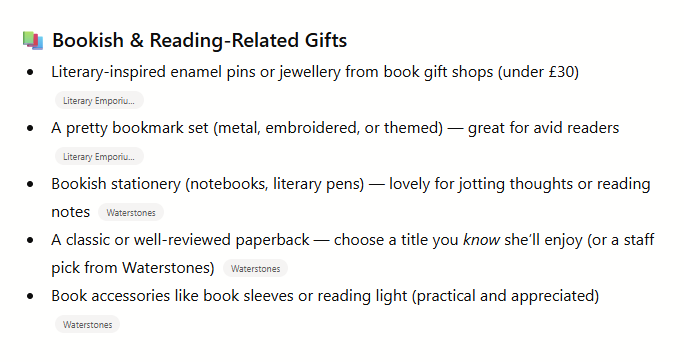
Where it DOES work is in providing inspiration and lists of products, so if you're stumped for what to buy a relative for Christmas, have a chat with ChatGPT about it and see what it comes up with. Here's one of the categories ChatGPT offered me when I asked what I could get my (non-existent) bookish sister-in-law for Christmas within a £30 budget (complete with links to product pages):
See our AI tools to save you time and hassle guide for more AI-enhanced shopping tips.
-
Sniff out cheap perfumes and smell-a-likes

Forget department stores for perfume. A whole bunch of specialist online sellers offer it for a fraction of the price.
Better still, buy the even cheaper unboxed bottles, then get a pretty box and wrapping for a couple of quid. This way, gift recipients think you went to extra effort, but actually you saved extra cash. Read the Cheap Perfumes guide for full help.
Also see the Great 'smell-a-like perfumes' hunt, where MoneySavers have sniffed out some dirt-cheap dead ringers for posh perfumes available to buy online and in-store. They say Next's Just Pink smells like Ralph Lauren Romance, while M&S New York is similar to Chanel Allure.
Check out the Health & beauty MoneySaving board for other forumites' suggestions to bag goods at bargain prices.
-
Know your rights with online glitches
Mistakes can and do happen, especially in the fast-paced online world, and there can be some right whoppers online. If a £50 brand new iPad seems too good to be true, it usually is.
With these kind of offers where items are listed well below their RRP, you can't force retailers to sell them to you at that price. Retailers don't have to sell anything to you if they don't want to – deliberately misleading you is criminal though and Trading Standards can investigate.
If you spot a mis-priced mistake, you can try your luck. Online retailers will sometimes honour it if the price difference isn't too big.
Just be aware that if you do order a glitchy item, it can get cancelled, can run out of stock or at the worst, you'll be charged full-price, so weigh up these factors before going for it.
-
Planning to buy something at Boots? Wait for bonus points weekends

With Boots, it's all about the timing. The Advantage card gives three points for every pound you spend (worth 3p). It doesn't always make Boots* the cheapest, but there are times to take advantage of your Advantage card.
Boots often runs bonus points weekends giving, for example, 1,000 extra points on a £50/£60 spend in-store and online, especially around Christmas. So look out for these if you're doing a big shop.
Boots loopholes
If Boots advertises extra points when you buy any product from a particular range, the points' value is sometimes worth more than the cost of the product. In fact, sometimes the store even PAYS YOU to take it away.
For example, it once advertised 500 points (worth £5) with selected fragrances. As cologne water cost £4.39, you could have got it free and made a 61p profit. See our Boots deals page for all the latest bargains.
-
Always spend gift cards as soon as possible

If you've received gift cards or vouchers, use them as soon as possible to avoid losing out.
There are three reasons you should use them as soon as you can:
Sometimes retailers go bust. A host of big-name retailers have gone into administration in recent years (including Debenhams, Wilko, and Toys R Us). When this happens, they stop accepting gift cards altogether.
You could forget or lose them. There's also a chance you may forget to use them if you don't do it as soon as possible. Or you could lose them, or accidentally run them through the wash if you happen to leave them in your pocket.
Gift cards have expiry dates. Most gift cards must be redeemed within a certain amount of time, so make sure you spend them before time runs out.
Here are some of the most popular gift cards you can get in the UK, and when you can expect them to expire:
Gift card expiry datesRETAILER
EXPIRY
Amazon
10 years (from issue)
ASOS
2 years (from issue)
Boots
2 years (from issue or last use)
Dining Out
2 years (from issue or last use)
Dunelm
2 years (from issue or last use)
John Lewis
2 years (from issue or last use)
M&S
4 years (from issue or last use)
One4all
None (after 18 months, 90p gets deducted monthly until balance reaches 0)
Sainsbury's
2 years (from issue or last use)
Tesco
5 years (from issue or last use)
-
How to avoid Amazon's delivery charges

If you aren't an Amazon Prime member then in most cases you've got to spend £35 to qualify for free delivery at Amazon – but there's a way to get round this.
A trial of Amazon Prime* (usually £95 a year) gets Prime newbies a month's pass for free delivery (though a few previous triallists may also be offered another trial). To check, log into your account, follow the link and see if it says "try Amazon Prime free". See our guide to Amazon's subscriptions for more ways to save money via Audible, Subscribe & Save, and Amazon's other subscription offerings.
Make sure you cancel before your free month's up or you'll automatically be charged £8.99 a month (or worse, £95 for a whole year). We've heard a load of complaints from people who've been charged for Amazon Prime without knowing why. For more, see the Reclaim unwanted Amazon Prime guide.
Another tip is to use the Super Saver Delivery tool to find cheap items to hit the £35 free delivery mark. It only works for items from Amazon itself (not the Marketplace). See Amazon buying tips for more information.Reclaim unwanted £95 Amazon Prime
Have you been hit by a £95 fee for unwittingly using Amazon Prime?
We've seen scores of complaints from confused shoppers whose accounts have been debited by Amazon without them knowing why. Our Reclaim unwanted Amazon Prime guide shows how to get your money back. -
Reclaim costs for failed delivery
It's enough to make you fume. You've been told you need to be in for a delivery and take a day off work but end up twiddling your thumbs because they're either hours late or don't bother turning up at all.
Yet you CAN fight back if you know your rights. You may even be able to force compensation for the lost time.
See the Delivery Rights guide to make sure you're armed with the full info.
-
How to check websites' legitimacy
Bogus websites are often set up to cash in on popular products such as iPads and Tiffany necklaces, so be wary if you're shopping on an unfamiliar site. And don't think that because it appears on a reputable search engine, that makes it a reputable site – always check.

Nothing is perfect, and there are flaws in all of the methods below, but in general it helps if you follow these quick tips:
-
Look for a padlock sign and "https" in the address bar. Most folks know to look for a security padlock on a website's bottom right, but that doesn't mean the site's legit, just that payment's secure. When making a payment, the "http" should appear as "https" in your address bar, This is important when shopping online because it keeps your personal and payment details private and stops criminals from tampering with them as they’re sent to the website.
-
Is it a registered UK company? To find out who registered a UK site and when, search the Whois database. Reputable limited firms (not sole traders) should also appear on the Companies House site, the UK Government's official companies register. Be very wary of businesses with just a PO Box or email address.
-
Google for feedback. The internet's a powerful way to hunt out other consumers' experiences. Easiest of all, do a quick Google search for the company name next to the word 'complaints', for example "Delboy Ltd complaints" and look for trends and feedback. You can also look up 'is [company name] safe' or 'is company name legit'. Reddit and Trustpilot are usually good places to quickly get an idea of customer experiences with a given site.
-
Press releases, newspapers & comparison sites. Again, Googling the product or site could bring up press releases on its launch, plus online newspaper stories could give you a good indication whether it's safe to use. When using comparison sites, does it appear in searches?
-
Understand that sometimes there's no protection. Ultimately, there's always a risk that a company can go bust. Sometimes you have to make a judgement call on whether you're willing to take the risk of parting with your cash.
Don't be overly scared by all this. Every day we all make transactions based on trust, and this is part of that.
-
-
Always read the terms and conditions
We're not denying they're boring, long or full of convoluted business-speak, but the T&Cs are important – that little tick-box confirming you've read, understood and accepted them could be a deal-breaker later if things go awry.
Even if you don't read the legalese, always at least read the standard terms and conditions before you pay to know exactly what is included and excluded in the exchange. Plus, always ask questions beforehand if there's anything you don't understand, in writing or by email if possible, before you seal the deal.
-
Haggle online via online chats, & other shopping secrets
Spot a window offering a live chat with a help person? Don't dismiss it – you can haggle via online chat to reduce the price.
Our Shopping secrets and Insider MoneySaving tips guides feature this and other insider tricks from the retail world to help you slice down the cost of clothes, electricals and much more.
-
Score up to £150 vouchers by playing credit card freebies

You can perform a legal smash-and-grab raid on credit card companies.
Freebies such as £40-£150 vouchers are available by spending the normal way on a credit card. The key is to always pay off IN FULL each month to avoid debts and frightening interest rates.
Why do cards offer freebies?
Credit cards are a lucrative business and companies are often willing to pay up to £150 to acquire a new customer – small potatoes compared to their potential profit from debts. Free gifts or inducements to sign up are becoming the norm.
See Credit card rewards for full top picks and warnings (Official APR examples).
-
Think before you tick the extra warranty
Often when you're buying larger electrical goods online, there's are optional tick-boxes for adding a warranty, care plan, breakdown cover, "product protection policy," or whatever else they're calling the guarantee.
These cover your appliance for mechanical or electrical failure, but you'll need to gauge for yourself if they're worth it. A one-year warranty extension for a £1,200 laptop at £30 could be worth the peace of mind, but a £10-a-month 'care plan' for a £250 dishwasher would end up costing as much as the device itself in two years.
It's worth looking out for tricks to get totally free or cheap cover, for example via credit cards, standalone policies and sometimes through your home insurance.
-
Don't always assume it's cheaper online
Speaking to staff face-to-face in-store allows you to add a bit more charm and chutzpah to your haggling, especially if bulk-buying or bartering for discounts on faulty items. It can be worth benchmarking prices online, then using the tips in our High street haggling guide to get the costs slashed further.
-
Get organised to avoid expensive last-minute delivery charges

If you need something by a specific date, for example, Christmas or a birthday, then it's important to think about last order dates to make sure you don't get caught out and forced to pay costly last-minute delivery charges.
As miraculous express or next-day delivery options come with equally dazzling costs, it's best to get organised to allow enough time for the item to be posted to your address at the cheaper or free price.
-
Before splashing out, could you hire?
If you've got your heart set on a designer number (not MoneySaving), you could hire rather than buy to shave off the cost of a little luxury for an evening. For example, we spotted designer heels you could rent for £16.50 for a day, which would cost £345 to buy new.
MSE Jenny's Top designer clothes rental sites guide goes through the options (including big names such as Victoria Beckham, Jimmy Choo and Whistles), as well as all the need-to-knows.
Do watch for soilage and damage costs and extra charges if items are returned late. Also check eBay – it can be far cheaper to grab items second-hand there, then resell them when you're done.
-
Mums-to-be can grab special baby club discounts

Retailers are super-keen to bag new parents' custom with baby promos. Just make sure you only take them up on the good ones!
For example, sign up to the Boots Parenting Club* for freebies, special offers and free mags aimed at your child's age group and eight Advantage points for every £1 spent on baby items.
See the Baby checklist guide for a full ABC of tips to save if you have – or are due to have – a little one.
-
Beware '£10 off next purchase with our online discount' promises
Some sites boost revenue by allowing membership clubs such as Complete Savings to push offers once you've bought stuff on their sites.
These services typically offer a discount or cash back on your next purchase, but users are signed up to a monthly payment and some have complained the terms and cost are not clear. They're not a scam exactly, but potentially something of a subscription trap. We have several MSE forum threads on this topic, so you can get a feel for how our community feels about these programs.
Things have improved in recent years, but it's still worth keeping your wits about you.
-
Before buying, check if you can get it for free

Before you part with your cash, first check if you can get the same or similar item for free via Freecyle or Freegle. Sometimes new as well as second-hand goods are offered on these local web communities so there are real bargains to be had.
How do they work?
It's all about web communities – go via the main site and you're sent to free-to-join, volunteer-run local email groups (though nowadays you can also view much of it on their sites).
It can be a source for freebies to kit out your pad with a sofa, espresso maker or even dungarees to lounge in. But the spirit of it is that it's a recycling community, so you should give, as well as get. See the Freecycle & Freegle guide for more info.
-
Buy out-of-season

A golden oldie this one, and based on the number one principle of economics: supply and demand. If demand dips, prices fall to attract buyers. If demand's high, the power's in the hands of the retailer, which can charge a little extra.
The weather and season can be big factors shaping how much an retailer is willing to sell goods for. For example, at the peak of summer, it's flip-flop and bikini season and few people are buying winter coats.
Buy at the right time and you could save yourself a small fortune. Also, many MoneySavers stock up on Christmas and Easter goods after the event and stash goods in their cupboards for the following year.
-
Land web prices on the high street
Many high-street retailers will price-match internet prices when pushed and some offer price-beater deals.
Compare prices to find the cheapest retailer, then make a note of the results and see if the shop will match the price. Don't feel you need to buy the product in the more expensive store to get the discount, just tell them about the cheaper deal. If you're feeling naughty, keep your thumb over the delivery cost.
If you have a smartphone, you can compare prices wherever you are, for example via Google Shopping. This involves a bit of thumb-and-legwork but can yield good results:
I got a Panasonic DVD recorder which was £240 full price, on sale in Richer Sounds for £170. I found it for £150 online and so they price-matched and beat it by £10 to give a total cost of £140."
– Forumite ncrosslandWho's this guide for? This guide is for those looking to save on their online shopping costs.
There's more shopping help across the website, including:
Supermarket shopping tips | How to get free (or cheap) food | 30+ Amazon tips | Costco tips | Haggle on the high street
Share this guide?