


30+ ways to stop scams
Scams can trick even the most savvy – so WATCH OUT

Scams are so rife you'd struggle to find anyone who's not been targeted. They're more sophisticated than ever and continue to deprive people of money – sometimes life-changing amounts. This guide explains what to look out for.
Lost money to a scam or had money taken?
Head over to our Help, I've been scammed! guide instead.
What are scams?

Scams are fraudulent schemes that trick people into parting with their personal details and cash.
Scammers target people through emails, text messages, online banking, shopping platforms, social media and more. But while fraud is increasingly sophisticated, people are still duped by 'old school' scam letters and phone calls.
Some scams are pretty obvious. For example, have you ever received an email explaining that a distant relative has died and there's no one but you to inherit their £100 million fortune – all you need to do is pay £500 upfront to release the funds?
But some scams are far more subtle and deceptive, like the AI-generated videos of MoneySavingExpert.com founder 'Martin Lewis' that have started appearing.
Don't be tempted to dismiss scams as something that only affects the gullible. Fraud – of which scams make up a significant part – happens to be the most common crime in the UK. Staggeringly, it results in people losing around £7 billion a year.
Unfortunately, this guide can never be completely comprehensive with all the latest scams, but we aim to help you to learn what to look out for. Here are our top tips:
How to spot, avoid and protect yourself against scams
-
Beware LIAR Facebook, Bitcoin & investment ads implying Martin or MSE recommends them
Whether it's Martin's picture on claims management firms or boiler incentive ads, scam binary trading ads, energy door-knockers using our name, or cryptocurrency pop-ups with an image of Martin encouraging you to invest, they are all an attempt to leech off the hard-earned trust people have in us. Don't touch the ads.
See Martin's video rant below.

 MoneySavingExpert.com founder Martin Lewis warns of LIAR Facebook and other ads that imply he or MSE recommend them
We've got a whole guide dedicated to this topic. See our Fake Martin Lewis adverts guide for what these types of scam look like and how to report one.
-
Always remember the old saying... 'If it sounds too good to be true, it probably is'
If a product is the cheapest you've ever seen, you're offered free advice or promised fast cash or unbeatable returns... it's probably a scam.
You should always independently seek financial advice before making any changes to your pension or investing large sums of money.
-
Common scams to watch out for

Scammers are good at making their scams look authentic. So don't be taken in by professional-looking websites and marketing materials without first checking their authenticity.
A perennial favourite is the email announcing you're due a tax rebate, or threatening you with arrest over 'unpaid' taxes. HM Revenue & Customs (HMRC) will never email, WhatsApp message or text you with this information, and have produced guidance on what's genuine HMRC communication and what's fake.
But there are many more types of scam out there – some older, some more recent. Here is a list of common scams you should be on your guard against:

Bogus calls. Claiming to be from the Government (or even MSE) talking about Reclaiming bank charges.
Pension 'liberation'. See our Release pension cash guide for more about pension liberation scams.
Text messages claiming to be from Royal Mail, Post Office and other delivery services (such as Evri and DPD). Asking you to click on a link and pay a fee so that a parcel can be delivered. More than 75,000 people reported receiving such messages from 'Evri' in the 12 months to April 2024.
Text messages saying you've been left a voicemail. To access the 'voicemail', you're prompted to click a dodgy link in the text.
Vishing. This is where scammers tell you they're from your bank, there's been fraud on your account and would you call them back. But instead they wait on the line and then get you to hand over bank details.
Miracle cures or miracle weight-loss pills. Ketones are a common example.
Fake bank or subscription emails. Asking you to re-verify account details.
Messages from 'Amazon' or 'Prime'. Asking you to provide payment or account information. Amazon will never ask you to provide sensitive information over the phone or via any website other than Amazon.co.uk.
Investment scams. The FCA's ScamSmart can help you to spot investment scammers and has a database of dodgy companies to avoid.
Deceptive prize draws and sweepstakes / get-rich-quick schemes.
Fake court summons. More on this at Report Fraud.
Job scams. See JobsAware if you've been the victim of a work scam.
'Parking fine' text messages. Including some which use the branding and website of the Supreme Court to appear legitimate and threatening.
Driving lesson / driving test scams. Using platforms like Facebook, Instagram and WhatsApp, scammers convince wannabe drivers to part with money up front to reserve lessons or test slots that don't exist.
Property rental scams. Scammers advertise properties for rent that they don't own or have access to. Property hunters are typically told to pay one month's rent up front to 'secure' or view the property.
Computer-generated Martin Lewis videos. Watch out for these, as they're scarily convincing. We've seen them on various platforms, including YouTube.
Messages from the 'Financial Ombudsman' or 'Financial Conduct Authority' asking for personal details. Neither the Ombudsman nor the regulator will ever contact you out of the blue asking for such information – the Ombudsman will only be in touch if you've got a case with it already.
You can read more about financial scams on the Financial Conduct Authority website and scams in general on the Take Five website.
And keep tabs on emerging types of scam via HSBC's 'latest scams' page.
-
Scammers are targeting hardship payments
Scammers are taking advantage of the cost of living with bogus offers of rebates, grants and hardship payments. Official Government support payments are usually automatic, so if you get a request for information out of the blue then be wary.
Full details in our Cost of living scams news story, but in brief:
-
Beware texts asking you to claim or apply for cost of living help – payments are automatic. We've seen bogus texts claiming to be from 'Gov.org' and from 'DWP'. Some people have received scam texts followed up by an email asking readers to call a fake number to provide more information.
But you DON'T need to apply to claim cost of living support payments. If you qualify, you'll automatically receive the money into your bank account.
-
Councils will NEVER call to ask for your bank details. Again, be wary about giving out your bank or card details over the phone if you get a call about council tax rebates. Normally, such rebates are paid automatically by councils.
-
Ofgem is NOT offering an energy rebate. Beware if you get a scam text inviting people to apply for an energy rebate – they don't exist. You will never be texted by Ofgem to sign up to anything to get money or a rebate.
-
-
Suspicious call from your 'bank'? Call 159
There's a secure and easy telephone hotline that can check if a suspicious call was genuine. The number is 159 and is operated by Stop Scams UK.
So if you receive a suspicious call from your 'bank' or asking you to transfer money or divulge personal details, hang up and dial 159. You'll be connected directly to your bank, which should then be able to advise whether the call was genuine. (If you struggle to connect to 159, contact your bank in the normal way).
Be mindful that suspicious calls can take many forms. For instance, the Co-op Bank has reported cases of scammers pretending to be from its own anti-fraud department. So don't just assume that a call which appears to be from your 'bank' is legitimate – if unsure, hang up and dial 159.
Most major banks are connected to the 159 hotline, including:
Bank of Scotland, Barclays, Chase, Co-op Bank, First Direct, Halifax, HSBC, Lloyds, Metro Bank, Modulr, Monzo, Nationwide, NatWest, Revolut, Royal Bank of Scotland, Santander, Starling Bank, Tide, TSB, Ulster Bank.
More than a million calls have been made to 159 since its launch.
-
Bank NEVER reach out asking PINs or passwords
If you get an email or text from your bank about fraud, ask yourself whether or not that's the usual way you receive contact from your bank...
One thing banks never do is call or email asking for your PIN or passwords. Banks will also never send someone to your home to collect cash or bank cards. Another giveaway that a message from a 'bank' is a scam is the name of the sender looks off – for example, 'H S B C' (spaces between letters) or 'tsb' (all lower case letters).
If unsure, independently find your bank's contact details and call the real thing.
-
Watch out for poor gram-mar or dodgy speelling

Watch out for emails and text messages that are badly-worded or littered with spelling and grammar mistakes.
Banks and retailers will spend time crafting their messages, and they'll proof them too – so bad grammar, dodgy spelling and poor punctuation are likely to be picked up.
But phishing emails and text messages aren't likely to go through such a rigorous process, so mistakes are common.
Can you spot any signs that the text message on the right from 'Evri' is bogus, such as poor grammar?
-
NEVER click links in suspicious texts or emails
Similarly, don't call the phone numbers listed in suspicious messages.
If you think the message may be genuine, independently research the phone number or website of the organisation and contact them that way.
-
When is bbc.co.uk not bbc.co.uk?

Warning: not all links are genuine.
By 'hyperlinking' text you can make a link say anything. For example, where does this link – www.bbc.co.uk – go? To the BBC, right? Hover your mouse over it and read what it says at the bottom of the screen – and sometimes even that's foolable.
Similarly, where do you think www.moneysavingexpert.1.com goes? Well, it's not to MoneySavingExpert.com. For web addresses, it's what's before the .com or .co.uk that counts – so this would go to 1.com (which doesn't exist).
It's worth looking out for these things in web addresses, as it's easy not to notice extra characters or hyperlinks. Always look where you're clicking.
For more, see Martin's Spam spotter rules blog (an old blog, but still relevant).
-
Get free antivirus software
Viruses don't just ruin your laptop. They can help steal money or even use devices to commit crime. Some even lie dormant, waiting to be activated.
To help prevent viruses it's worth keeping your laptop or device backed up with free antivirus software. See our guide on Free antivirus software for more info.
-
Get help choosing and storing passwords
Scammers regularly steal password information and share it on the dark web, which is why picking a strong password is VERY important.
Try to use unique passwords for all your online logins. If this sounds difficult, try a password manager. These can generate randomised passwords for your various accounts and store them all to be accessed with one master password.
If you'd rather create your own passwords, make sure they are as strong as possible so people cannot guess them. Passphrases are stronger and generally easier to remember than passwords. An easy way to set a passphrase is to use three random words, then join them together to create one long word.
Don't use the same password for multiple accounts – if you do, this increases the likelihood of someone being able to access several accounts belonging to you.
See Martin's Password help blog for more info (it's from 2011, but still relevant).
-
Beware phishy links asking for your password

'Phishing' is an email scammers send in the hope you've got a connection to the company they're pretending to be from. 'Smishing' is the same thing but a text or WhatsApp is sent instead of email.
Many of us have received phishing messages like this, along the lines of "your bank security is broken, click here", "we need your help to retrieve funds" or "your subscription's about to run out".
The messages disguise attempts to steal your passwords, bank details and money. Often there'll be some sort of link included in the message.
When you click on it, it'll likely take you to a professional-looking website – a mirror image of the real thing. You'll be invited to enter your password, at which point...
...you may well be deprived of your cash.
NEVER open an attachment unless you're 100% sure of its contents. EVER.
A quick and easy way to report scam emails
The National Cyber Security Centre has a suspicious email reporting service – all you have to do is forward suspicious emails to report@phishing.gov.uk.
Once you've reported a suspicious email, the NCSC will analyse it and any websites it links to. If it believes it's malicious, NCSC may:
Seek to block the address the email came from.
Work with hosting companies to remove links to malicious websites.
Raise awareness of commonly reported suspicious emails.
While the NCSC is unable to inform you of the outcome of its review, it has assured us that it acts upon every message received.
The NCSC also has an online tool where you can report suspicious websites. And if you've received a scam text message, you can forward it to 7726 for free, which will report the message to your mobile phone provider.
-
'Phishing' and 'smishing' – then there's 'vishing'

If anyone calls claiming to be from a bank, insurer or utility provider, NEVER give your personal or password details – it's likely a 'vishing' attack. Say you'll call them back, but find the number yourself.
Don't rely on caller IDs, or anyone drawing attention to them. Scammers can clone numbers, so it may look like the number your bank uses to call you. If you can, use a different phone to the one you were called on.
Sometimes scammer will tell you your account has been hacked, and will encourage you to phone your bank. The catch is they don't hang up after the initial call. They stay on the line and play a dial tone, while you think you are calling and then speaking to a bank employee... where you'll be asked to 'share your details'.
-
Filter out fake deals in your social media feed
The flood of online scams, cons, hoaxes and frauds which litter social media websites such as Facebook and Instagram are a modern scourge.
Scores of people are fooled every day by these bogus offers and competitions, where scammers tempt you to part with your personal information which they can then sell on to third parties – or even worse, use to steal your identity.
On Facebook (including Messenger), Instagram and WhatsApp users can flag ads they think are scams or misleading. See Meta's how to report an ad page for more.
There are simple ways of telling what's legit and what's fake:
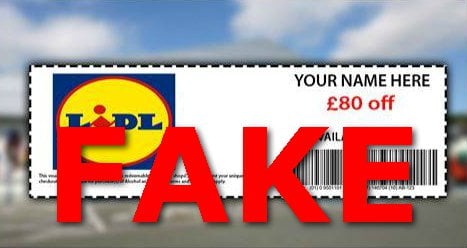
'£80 Lidl birthday vouchers for everyone!'
When there are stonking deals and we include them on our site or in the weekly email, we will have checked they are thoroughly legit.
But if Lidl is giving away £80 vouchers to everyone for its birthday or 100 free flights with British Airways and it sound too good to be true… it probably is.
There are genuine competitions on social media, but it's unlikely companies would give every single person who enters such an expensive prize.
Looking out for spelling and grammar mistakes
Many scam ads on social media are littered with spelling mistakes. Genuine offers from a major company would undergo quality and spelling checks.
One ad supposedly giving away Range Rovers was titled "Rannge Rover".
Sometimes the mistakes are more subtle. One British Airways scam we found said: "Congratulation! You have won 2 free British Airways Ticket!"
Look at the images for inaccuracies
We've seen people fall for Easyjet hoaxes in which supposed round-trip tickets are up for grabs due to last-minute cancellations.
The scam advert below came with images of luxurious business class seats – but Easyjet doesn't even have a business class section...
To get genuinely cheap Easyjet deals, see our Easyjet tricks guide.

Look for small details to check if a page is legit
With Facebook, Instagram, TikTok and YouTube, the profiles of companies (typically larger ones) and notable individuals will be labelled 'verified'.
As a general rule, verified status means a company's or individual's social media account is legitimate because its identity has been confirmed by the respective social media platform. Yet plenty of companies aren't verified.
If that's the case, look for details which might indicate a page is legitimate – lots of 'likes' or followers, for example, which spoof accounts won't have.
If in doubt about a social media account, look up the relevant company's website, as many tend to link directly to their official social media account.
Do watch out. A few years back, one bogus 'Disneyland' page claiming to give away huge prizes was a pretty convincing fake. It used the same logo, header and information as the REAL Disneyland page, but it wasn't verified. It also had only that one competition post on its entire Facebook timeline and the page had only 6,000 likes (the real Disneyland account has 16 million).
Carefully check links are going where you'd expect
When you click one of these scams you'll often be taken away from social media to another website, so it's really important to check the URL to ensure you're not being led into dodgy online territory.
If Legoland was giving out free tickets, you'd be taken to Legoland.com. But in one scam, you are taken to Legoland.com-everythingfree.com.
One Easyjet scam had "crook" in the URL (something to avoid clicking on).
Look for warnings on real company pages
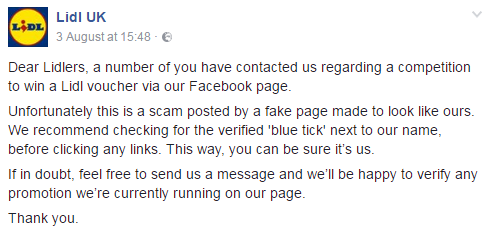
Major supermarkets have fake voucher giveaways circling the net, so legitimate social media pages will normally post warnings about them.
If you 'like' or 'follow' the real pages, you can easily check what's legit.
Beware fake WhatsApp promos
Companies use apps like WhatsApp and Messenger to send news and offers to customers. But as a result scams can appear on these apps too.
Here's an example of an 'Alton Towers' scam on WhatsApp a few years ago:
Fortunately, both the message and the website it linked to were riddled with telltale signs it was a scam. Alton Towers later confirmed this was the case.
MSE often features Alton Towers deals, but we check these thoroughly.
-
Be wary if you've been asked to pay upfront
You should never have to pay to access prizes or funds due to you.
If you're asked to wire money over as a stop-gap for fees and taxes, you likely won't see the money again and you'll be left out of pocket.
-
Watch out for loans where you need to pay a 'fee'
Be suspicious of a 'loan' where you need to pay a fee before receiving the money. This could be a case of loan fee fraud, where you pay a 'fee' but don't get a loan.
In general, be especially wary of any loan you're offered where there's:
-
A requirement to pay an upfront fee.
-
Pressure to pay this fee quickly.
-
A request to pay in an unusual manner (vouchers, money transfer, etc).
If in any doubt about a lender's authenticity, always check whether it's regulated.
-
-
Expecting a parcel from Evri?
Evri, one of the UKs' biggest parcel delivery companies, is a regular target for scammers. So, if you use Evri, watch out – and remember its 'three Ls':
-
Language. Any message from 'Evri' that includes poor grammar, spelling and odd phrasing should ring alarm bells.
-
Lack of a personal greeting. This doesn't just mean lack of a 'dear customer' or 'hello' at the start of a message. Messages from Evri typically contain personal information – such as a tracking number or delivery address – so if this is missing, the message could be well a scam.
-
Links. Be wary of unusual links or buttons urging you to take action, such as paying a 'redelivery fee'. This is something Evri never charges for.
See the Evri website for more tips on how to spot an 'Evri' scam.
-
-
Google doesn't always return reputable sites

Don't automatically assume a website is genuine just because it appears on a reputable search engine.
Always check first, especially sponsored links as these pay to appear at the top of search engines – on Google, a sponsored link normally appears at the top of a search page and will be clearly labelled as an 'Ad' to tell you it's paid for.
One example a few years ago saw payday loan brokers appearing in search engines after people typed in 'credit union loans'.
Search engines might also return bogus websites where you're looking for free debt advice – for example, from charities StepChange and National Debtline. Don't be reeled in by 'Step to Change' or 'Step Changing' impersonators.
Remember: check where the link is going before you click.
-
Be careful of urgent deadlines
Nothing needs to be done immediately. Even if your account has been hacked, get in touch with your bank or provider via the appropriate channels.
If you're being asked to hit a deadline, something dodgy is probably going on.
MSE Kit almost fell for this urgent deadline trick when a message from a Booking.com 'host' claimed he had 12 hours to act or his reservation would be cancelled. Read more about MSE Kit's brush with a scam in his team blog.
Report Fraud reports this type of Booking.com scam is on the rise.
-
Shred sensitive papers you don't intend to keep

Never give your bank account details or PIN to someone you don't know. It's also wise not to have an easily guessable PIN (like 0000 or 1234).
But if there is an unauthorised transaction on your account, contact your bank or provider straightaway.
In addition, shred and dispose of any sensitive financial documents – bank, credit card and pension statements – that you don't intend to keep in a safe place.
-
Watch out if a company uses 'Dear Sir or Madam'
Genuine companies should know who they are targeting with emails, texts and letters. So while 'Dear Sir/Madam' may sound polite, it should set off alarm bells.
Many banks will include something in their communication to identify you and show they know something about you. They'll likely use your name and may include your account number or postcode – info scammers aren't likely to have.
-
Be savvy when online and using social media

If you've a social media account or are signed up to any forums where you can share messages, limit the amount of personal information you publish online
For example, don't share your address and then tell the world you're going on holiday for two weeks.
-
Don't text away your fortune
Legitimate marketing messages should identify themselves in the text or in the sent-from number. If not, it's breaking regulations and can be classed as spam.
Spam texts are often generic, claiming you're owed accident compensation, a refund or tax rebate. Others claim they're from parcel delivery firms or Royal Mail.
If you get a spam text, report it for free to your network provider on 7726.
And remember: don't respond to the message!
-
QR codes can be hijacked by scammers

QR codes are everywhere now, from pub tables to train station platforms and flyers on the street.
Yet while QRs codes are a common way of accessing websites or making payments (among other things), scammers are known to piggyback off legitimate QR codes and create bogus ones.
By engaging with a bogus or compromised QR code, you risk revealing personal and financial details to scammers. A woman at a York train station lost £13,000 after scanning what she thought was a genuine QR code (the original had been plastered over with a fake) and finding herself on a scam website.
So while QR codes are normally legitimate and safe to engage with, you should still exercise caution. Here are some tips to stay safe:
Check if the URL looks legitimate. When scanning a QR code, check that the preview URL which appears tallies with where you expect to be taken to.
Look for signs of tampering. For example, does the QR code look like it's been placed on top of another QR code or the original removed.
Beware of low quality-looking websites. If a QR code takes you to a web page, look for common signs of a scam like low quality images and typos.
Be cautious of unsolicited communication containing QR codes. If in doubt, contact the company and ask whether the message is legitimate.
Don't scan or open QR codes from strangers. It seems obvious, so avoid it.
-
Be wary of numbers starting 084
As numbers starting with 084, 087 or 09 are premium (calls to these numbers are charged at a higher rate), most reputable companies have stopped using them. But scammers have started using these numbers to trick people out of money.
The most common scam starts with a missed call – in most cases it doesn't ring long enough for you to answer – and when you call back you're charged a fortune. Even if you don't actually call back, your bill could sometimes still show you've made a call lasting anything up to 12 hours (also resulting in a massive charge).
Another involves text messages. Scammers pretend to be from your bank and warn you a dodgy transaction is about to take place and you need to call an 084 number to stop it. Calls are usually held in a queue before cutting off, but you're still left with a hefty bill – so use your bank's genuine number if you're concerned.
Unexpected charge on your phone bill?
If you've noticed a charge on your phone bill but are unsure whether it's fair or something more sinister like a scam, take steps to clarify the situation.
Where the charge looks like it's from a legitimate company, you can decide on the appropriate next step – perhaps challenging the charge if you think it's unfair. But if it's the result of a scam, cease communication with the scam and report it.
Need help identifying an unknown phone charge? See PhoneCharges.org.
-
Use Citizens Advice's scams checker
Fraudsters continue to refine their methods, so it can remain difficult to distinguish between what's legitimate and what's a scam – even if you're scam-savvy. There are extra resources out there though which can help you spot a scam more easily.
One of these is Citizens Advice's online scams checker tool.
Simply answer a short set of questions, like where you found the 'scam' and what, if anything, it asked of you. Based on your answers, the tool will give tailored advice and hopefully make it clearer whether you have been targeted by a scam.
-
Always check for the terms and conditions
You should always read the terms and conditions before signing up to something – if there aren't any terms and conditions, this should ring loud alarm bells.
And if you've got any questions, ask them before putting pen to paper.
-
Search for complaints and reviews

The internet is a powerful tool to find other consumers' experiences. Do a quick Google or Trustpilot search for a company name next to the word 'complaints' or 'reviews'. For example, 'Delboy Ltd complaints'.
Take one-off complaints with a pinch of salt. It could be a competitor, someone malicious or a customer with a grudge. But if there are reams of complaints or reviews are overwhelmingly negative, it could be a sign that something is amiss.
-
Pay by credit card for added protection
Pay by credit card for something costing over £100 and Section 75 laws will super-charge your consumer rights. Unlike debit cards and cash, pay in full or part (even just £1) on a credit card and by law the lender is jointly liable with the retailer.
This means you've the same rights with the credit card company as you do with the retailer, so if things go wrong you can take your complaints there instead.
Remember that it's important you ALWAYS REPAY IN FULL your credit card each month, so there's no interest cost. See our Section 75 guide for more information.
-
Separate protection for purchases under £100

Section 75 doesn't apply to purchases under £100, but there's still an option for added protection if your purchase costs less than this. It's called chargeback, and while not a legal protection it's a good backup to Section 75.
So if you spend less than £100 on Visa, Mastercard and Amex credit cards – or any amount on most debit and charge cards – but the goods don't appear within 120 days or they're faulty, you can ask your bank whether they can reclaim the cash from the seller's bank.
See the full details in our Chargeback guide.
-
Paying via PayPal? Mark as 'goods and services'
Neither Section 75 nor chargeback usually work if you pay via PayPal, but you can give yourself some protection by marking a payment as 'goods and services'.
Doing this means if something goes wrong, you might be able to claim the money back through PayPal's buyer protection scheme. Though as this is a PayPal policy rather than a statutory right, it's up to PayPal whether or not to reimburse you.
PayPal payments marked as 'family and friends' are NOT covered by PayPal's buyer protection scheme, meaning you've even less protection here.
-
Make sure any payment you make is SECURE
When you pay for something online, check the site is secure. This doesn't mean a site isn't a scam, but any data you enter is encrypted (so it's harder to intercept).
A secure web address will start with 'https' rather than just 'http'. Also look for a security padlock on your browser (usually next to the web address).
You should also sign credit and debit cards up to Mastercard Identity Check. And read how Visa gives your online payments added protection.
-
Be alert in case your property is a target
It might sound unlikely, but one homeowner in Luton had a nasty surprise when his property was sold by scammers without his knowledge (he was living elsewhere at the time and only made the discovery when neighbours noticed movement inside).
While such incidents aren't common, it's a warning of what could happen if you fall victim to identity fraud. There are a few things you can do to mitigate the risk:
Eng/Wal – sign up to HM Land Registry's property alert system
Choose up to 10 properties to monitor and you'll be notified any time a search or application is received by HM Land Registry in relation to one. You don't need to be the owner of the property to monitor it (so you could do it to help out elderly friends or relatives). Sign up at HM Land Registry property alert.
Do note you can only monitor homes that are registered with HM Land Registry.Eng/Wal – add a 'restriction' to your property
Alternatively, homeowners can prevent HM Land Registry from registering a sale or mortgage on their property without a certificate from a solicitor or conveyancer.
To do this, a restriction needs to be added to the deeds of the property. This involves either you or a solicitor filling out an application form and sending it to HM Land Registry. Restriction applications cost a £40 fee if you live at the property, or they're free if you live elsewhere. More information on how it works at Gov.uk.Again, to do this your property will need to be registered with HM Land Registry.
My property isn't registered with HM Land Registry – how do I rectify this?
More than 85% of property and land in England and Wales is registered with HM Land Registry. This includes any property or land that's been bought or mortgaged (including remortgages) since the 1990s.
Unregistered properties are at an increased risk of property fraud, so you should consider registering your property if it isn't already. Don't put it off until you sell up – this can hold up a sale and makes registering more expensive.
The process of registering a property can seem daunting as there are a number of steps involved. If you're feeling brave you can do it yourself, or you can get a solicitor or conveyancer to do it (though this will cost).
Full details of how to register a property can be found on Gov.uk, but in brief:
-
Check whether your property is already registered. By entering your address into the online register. If it doesn't come back with any positive hits, this is a good indicator your property isn't registered.
-
Check if there are any third-party interests in your property. By searching the Land Charges Department. This will cost a fee.
-
Fill in a first registration form. And send it to HM Land Registry.
-
Prepare a scale plan of the property. To show where it's located.
-
Write a list of the documents you've prepared. You need two lists.
-
Check the registration fee. It will cost roughly £200 to £500.
-
Send to HM Land Registry. Documents, application form and fees.
Northern Ireland – register an 'inhibition' on your property
Similar to adding a restriction to the deeds of a property in England and Wales, an inhibition prevents the Land Registry in Northern Ireland from registering a sale or mortgage on your home without your permission, or without first giving you notice.
You can apply for an inhibition by filling in a fairly straightforward application form and paying a fee (circa £100). To add an inhibition your property must already be registered with the Land Registry. More details can be found on NI Direct.
There's no equivalent action in Scotland
In Scotland, there's no equivalent of a property alert system or restriction/inhibition. But it's unlikely your property will be targeted because of how land registry works.
See Registers of Scotland for more info on how property owners are protected.
-
-
Help if you care for an elderly person
Anyone can fall for a scam, but the elderly are often targeted the most and hit the hardest. Many can lose their life savings, get into debt or have health problems.
If you care for an elderly person, look out for the warning signs. Are they getting junk mail or calls from strangers, or being secretive when discussing finances?
The ThinkJessica website has info on the types of scams that target the elderly.

Protect yourself against identity fraud

Identity fraud is the close companion of the scam and if you've been the victim of one it often means you're more vulnerable to the other. So treat identity fraud (ID fraud) seriously – and don't be tempted to think it's any less sinister because it doesn't always result in a loss of money.
ID fraud is where a criminal steals your identity and uses it to apply for credit and services, leaving you to foot the bill (though you're unlikely to pay if you can prove it wasn't you).
It can be the result of someone going through your rubbish, finding old letters and bank statements. Increasingly it's by sweeping personal details from social media or elsewhere online. Or it could be by harvesting personal information you've divulged to a scam.
Why is ID fraud a problem?
If you become the victim of ID theft, at best it'll be stressful and time-consuming to sort out. At worst, it can leave you out of pocket, dealing with debt collectors, facing court action and potentially struggling to get credit or a mortgage in future.
To put into perspective how pervasive ID fraud is, credit reference agency Experian helped prevent nearly £10 billion of fraudulent applications in a period of just five years...
Ways to protect yourself against ID fraud
Some of the following tips you'll recognise from the stop scams guidance above:
-
Don't have a PIN or password that's easy to guess. Banks may not reimburse you if your PIN is easily guessable (0000, 1234, etc). See strong and unique password help.
-
Destroy important documents. Don't just throw them away whole as they can salvaged from rubbish bags. Tear up important documents or use a shredder to be sure.
-
Avoid sharing too many personal details on social media. Such as your date of birth, address, even your mother's maiden name.
-
Register on the electoral roll if you move home. Being registered at your new pad makes it harder for fraudulent applications to be made using your previous address.
-
Set up a postal redirect when you move home. The less post that turns up at your previous address, the less chance a criminal has of accessing it. See redirect your post.
-
Use Wi-Fi carefully. Have a strong password for your home Wi-Fi so criminals can't access it. And avoid signing into sensitive accounts when using public Wi-Fi networks.
-
Check bank statements and online banking regularly. To look for unusual activity.
-
Keep an eye on your credit report. If someone is making false applications for credit in your name, it will appear on your credit report. See our Check your credit report guide.
-
Consider adding a password to your credit report. By adding a password to your credit file – sometimes referred to as a 'notice of correction password' – lenders will need you to confirm that password each time a credit application is made in your name. You can add a password to each of your Experian, Equifax and TransUnion credit files.
-
Protect your phone. Ensure your phone and any sensitive apps on it have PINs or passwords to access them. And see our Tips to protect your phone from thieves guide.
Ex-partner know your passwords? Consider changing them
If an ex-partner or spouse knows your passwords, consider updating them.
We've heard stories of people using an ex's details to go on spending sprees and fraudulently apply for credit – leaving their ex to deal with the consequences, such as unwanted spending, missed repayments, marks on credit files and more.
By updating your passwords, this reduces the chance of this scenario occurring.
My daughter had her details used by an ex-partner to order lots of mail order goods that were never paid. We only discovered this later and then embarked on a very frustrating journey dealing with the suppliers that had lost out financially, the credit reference agencies and police.
What to do if you're the victim of ID fraud
If you think your identity has been stolen you should take prompt action to sort the issue out. Head over to our Help, I've been scammed! guide for step-by-step help.
Share this guide?