I upgraded my phone after four years, but can barely see the difference
Are you upgrading sooner than you need to?

Last month, I upgraded my phone from my trusty Google Pixel 6 to the Pixel 10. That’s a four-generation leap that I expected to translate to a substantial improvement. I was disappointed to feel almost no difference in day-to-day use, leaving me wondering whether phone tech has finally plateaued.
Now I know there will be readers waving their immortal Nokia 3310 in the air, proclaiming they’ve owned it since the turn of the century, that ‘it does what it needs to do’ (namely, calls, texts, and Snake) and there’s no need to upgrade. And it’s unlikely the discerning MSE readership falls into the trap of dishing out a thousand pounds for the latest iPhone every year.
Many of us fall somewhere in the middle – a moderate-use phone owner whose device is four or five years old and functioning fine, but there's still a temptation to upgrade. We might have the reasonable assumption that the 2026 equivalent of a 2022 phone would be a tangible improvement, or perhaps still have the memory of when an upgrade meant mind-blowing advances in technology.
When SHOULD you upgrade your phone?
If you want the money you spend to translate to an improved experience with your new phone, use the following criteria as a guideline:
When your phone stops working. If your battery barely lasts a few hours or your phone’s slowed to the point where it’s hindering your ability to use it for basic daily tasks (and you’ve tried both restarting and factory-resetting), it’s probably time to upgrade.
When your phone stops receiving security updates. Over the years, phone manufacturers have extended the amount of time they deliver security updates to their phones (reflecting the fact that people are holding onto phones for longer than they used to). Flagship phones from Google, Samsung, and Apple now receive security updates for around seven years, but once they stop, your phone becomes vulnerable to security threats, and you continue to use it at your own risk.
When apps stop working or getting updates. Even before your phone stops receiving security updates, you might stop receiving updates for key apps due to the operating system becoming outdated. There are ways around this (such as rooting your phone), but for most people that could be a sign to upgrade.
When you want specific things from a new phone. When considering an upgrade, take a good look at the features of your current phone and think about what you’d like it to do better. Better quality photos? AI features? More storage space? Better gaming performance? Quicker at opening apps and general navigation? Work from that and look at reviews rather than spec sheets or marketing claims when picking.
For more help choosing a new phone, see our mobile phone deals page, as well as our cheap mobile finder for more tailored advice.

Phone upgrades once meant huge, tangible improvements
In the early 2000s, upgrading a phone even every two years would yield some form of technological mini-miracle. This might have been going from a monochromatic to colour screen, or suddenly having a camera, picture messaging, and semi-functional internet.
I still remember excitedly using WAP on my Ericsson R320s (pictured) to watch the scorecard tick up in England’s iconic 5-1 victory over Germany in 2001. If I'd been sharper-witted as a teenager, I'd have renamed my phone Sven-Goran Ericsson in honour of the former England manager.
Later, I had a Nokia 5610 XpressMusic, which joined the wave of mobiles doubling as MP3 players. With each new upgrade, mobiles were quickly transforming from blunt telephony tools to Swiss army knives of technology.
That transformation was complete when touchscreen smartphones came flying in on the coattails of the iPhone in the late 2000s. For years after that, each new generation of phone was noticeably bigger, faster and sharper. At first it was a space race, with manufacturers trying to stand out and establish a foothold on this new frontier.
The pace of change slowed by the late 2010s. Displays settled into optimal sizes and resolutions, designs converged into near-identical black slabs that made it all too easy to swipe your partner's phone when rushing out to work, and speed improvements required more and more robust testing to be noticeable.
Fewer technological leaps could mean we save money
This phenomenon isn't necessarily a problem, and could even mean we save money if we upgrade less often. And that's been happening to an extent. Data from industry trade body GSMA shows that the rate at which people upgrade their phones has slowed from about every 18 months in 2006 to roughly every 3.5 years in 2025.

However, as someone who's just upgraded a four-and-a-half year old Pixel 6 to its successor four generations on, I'd argue that you should probably wait even longer (HOOOOLD!). When we reached out to ask MSE readers about their phone upgrades, we saw the phenomenon of underwhelming upgrades wasn't unique to the Google Pixel family, and was happening across even bigger timespans.
On Facebook, Dee told us about upgrading her six-generation-old iPhone to the latest model: “Upgraded this year from iPhone 11 Pro to iPhone 17 only because I needed more memory. Not noticed a great deal of difference tbh!”
Graham, meanwhile, jumped well over six years upgrading his 2018 Motorola to the latest model. He said:"I bought my current phone (Moto G55) last year, when my previous phone (Moto G6) was failing to gain any charge when plugged in. I had had that previous phone for seven years. Maybe the G55 is a bit better - it does not feel dramatically different."
I'm not the only one at MSE Towers to be disappointed either:
When the screen on my Samsung S20 went completely white last year, I decided to upgrade to the S25. Despite a five year gap between phones, there wasn't a huge difference in speed, or camera quality. But the biggest disappointment was the lack of an SD card slot, which had meant storage space on my old phone was basically unlimited. My new phone has already run out of storage.
MSE Sarah
Of course, not all upgrades are obsolete. If you own a budget £80 Alcatel phone and upgrade to the latest iPhone or Samsung S, you almost certainly will feel the difference in day-to-day use. My experience below applies to upgrading phones in the same product line, or general budget range.
It's likely however, that you would get much the same sense of upgrade (while saving hundreds of pounds) if you jump from a budget phone to a flagship iPhone or Samsung S even three or four generations behind the current one.
You’ll occasionally get new phones that trounce the competition (and their predecessors) in one particular area, such as the OnePlus 15 with its impressive battery life, or the Apple iPhone 15 Pro Max camera that was good enough to shoot the film 28 Years Later on. But if you already owned a high-end phone, even if it’s several years old, then on your new phone you really need to go looking for the specific improvements rather than have them manifest before your eyes as soon as you turn it on.
My underwhelming upgrade tale
Last month, I upgraded my Google Pixel 6 after four years of stalwart service. This was the longest I’d ever owned a single phone, and the upgrade was less from necessity and more from the irresistibility of a deal stack that meant I could get the latest Google Pixel 10 for a net spend of about £250 instead of £800.
But when I booted up the phone, transferred all my data over, and started swiping around, I couldn’t help but feel underwhelmed. I wasn’t expecting a four-year leap in smartphones to blow my mind and rewire my understanding of what phones are capable of, but I at least wanted to feel something of the old magic of getting a new phone. Swipe between screens faster, take better photos, maybe some new software feature that I might actually use.
As we'll see, the Pixel 10 does all those things in theory, but in reality, the differences are hard to notice.

Pixel 6 on the left. Pixel 10 on the right.
On paper, the Pixel 10 is a major improvement over the Pixel 6. Its display is significantly brighter, and with a 120Hz adaptive refresh rate over the Pixel 6’s 90Hz it has the capacity for a higher frame rate and therefore smoother image (though in reality, once frame rates go past 90 it becomes hard for the untrained eye to see this extra smoothness unless you're an avid gamer).
One of the major selling points of this generation's phones is AI. To that end, the Pixel 10 comes with a dedicated AI chip that improves its ability to run AI tasks and even AI bots locally on your device, such as translators, image analysers, and offline assistants. Interesting in theory, but in the month-plus that I've had the phone, the extent of my AI use has been limited to getting AI summaries at the top of email chains and for WhatsApp messages (which obviously I'm going to read anyway!).
I like the sound of the feature that brings up booking info on your screen when you're on the phone to the related car hire company, hotel, and so on, but haven't had the chance to use it yet. As you'll see, 'nice features for rare occasions' are bit of a running theme here...

My shiny new Pixel 10 has 12GB RAM instead of 8GB, as well as a Tensor G5 chip, which is five generations newer than the Pixel 6’s processor, and 60 to 75% faster according to Geekbench synthetic tests (Pixel 6, Pixel 10).
However, these tests only tell us how well a phone performs under artificial conditions that push the phone to its limit. They don’t translate to daily use – unless you’re planning on compressing and decompressing a bunch of files, editing videos, batch photo processing, running LLMs (AI bots) locally on your device, or other strenuous productivity tasks, usually in quick succession.
In daily use, I haven't felt this speed increase on my Pixel 10, because the Pixel 6 was already at a point where my day-to-day phone use – using the browser, banking, basic games, and social media – was seamless, even in 2026. Where lag or slowdowns are already infinitesimal, any improvements become virtually undetectable.
For perspective, YouTube channel Matthews Tech compares the speed of the Samsung Galaxy S25 Ultra and S22 Ultra and the Pixel 6 Pro and Pixel 9 Pro XL side by side. The phones being compared are three years apart, yet in some instances the older one is still faster!
One lauded upgrade is the Pixel 10 camera, which has a telephoto lens with 5x optical zoom. This means that the lens physically zooms in instead of just cropping and digitally enhancing a photo, resulting in clearer zoomed pictures.
That said, with regular photos it's harder to spot the difference. I managed to find photos I'd taken of some meals with the Pixel 6 and the Pixel 10, and was sure that putting them side by side would show a clear difference in quality between old camera and new.
They may not be like for like photos, but... can you tell the photo taken using the Pixel 6 camera vs the Pixel 10 one?

The photo on the left was taken using the brand spanking new Pixel 10, the photo on the right was with the humble Pixel 6.
Luxury over necessity
Not all the improvements require a microscope to observe, but it still helps if you know where to look. A lot was made of the Pixel 10's super-bright display (up to 3,000 nits vs. the Pixel 6's 800), and once I knew that I went out on a sunny day, cranked it up to full, and lo and behold: the display powers through any sun glare effortlessly! I don't recall a time where I was cursing my Pixel 6 display for not being bright enough in blazing sunlight, but with the Pixel 10, it's definitely a non-issue.
It also charges faster and battery tests show that it holds charge much longer than the Pixel 6 despite having only a slightly larger battery. That said, as someone who religiously charges my phone at the end of each day (don't we all?), I've never really find myself in the position where I'm begging people on the bus for cables so that I can charge my phone on those back-of-seat USB ports.
Both of the above improvements provide nice buffers for certain situations, and I'm sure there'll be a few times where I'll feel more grateful for a beefy battery and a bright screen.
That said, these very much feel like rainy-day (or sunny day) features than ones that improve my daily phone use, which is the same as most peoples'.
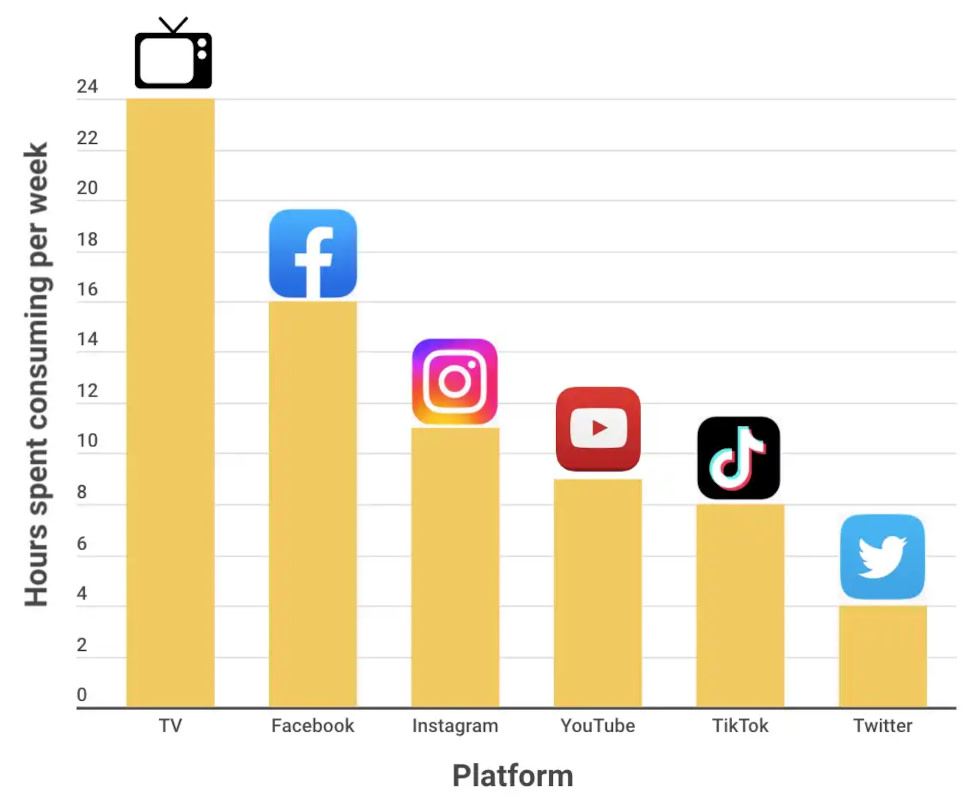
A Uswitch report on mobile phone usage showed that the 10 most popular apps on Android and iOS straddle messaging, social media, and music and video streaming – none of this stuff should bring a flagship phone released in the last five years close to full load.
So am I happy with my Pixel 10 upgrade? Sure, just about, but with the big MoneySaving caveat that I got it for 75% off. At anywhere close to full price, I simply wouldn’t have done it, and I could've comfortably held onto my Pixel 6 for another year or two.
 Latest weekly email






Recent blogs
 23 October 2026