



Supermarket coupons UK
Save on shopping with freebies & discounts for groceries and more

Coupons are said to have been around since the 1800s (the first one issued by Coca-Cola) and for years savvy shoppers have been clipping coupons, and later on, printing them off the web – but today, it's more about apps, codes and cashback. Do couponing the right way and you'll bag groceries for free or a fraction of the normal cost. This guide shows the top coupons available now, plus how to find even more.
Top Coupons
Full list of top supermarket coupons & discounts
This is our regularly updated list of the top coupons and cashback available in supermarkets. It's up to individual stores whether to accept any coupons, so don't make a special trip, and if using cashback, be sure to check you're picking up the correct product.
Food coupons
With Lidl Plus, including Mini Eggs, Smarties and Freddo
Lidl Plus members (free to join) can get selected Cadbury and Nestlé Easter eggs for 99p. The deal is available in-store at Lidl until Sunday 5 April. The following eggs are available:
-
Cadbury Buttons 90g – next cheapest, £1.25 at Tesco via Clubcard
-
Cadbury Freddo 90g – next cheapest, £1.25 at Tesco via Clubcard
-
Cadbury Mini Eggs 95g – next cheapest, £1.25 at Asda and at Tesco via Clubcard
-
Nestlé Smarties 100g – next cheapest, £1 at Tesco via Clubcard
-
Nestlé Terry's Chocolate Orange 91g – next cheapest, £1.25 at Asda
No Lidl nearby? Tesco is offering £1 Nestlé Easter eggs.

Via cashback. Get item from Tesco, Sainsbury's or Ocado only
If you buy a pack of Onken Kiddos kids' yogurts 4x90g at Tesco, Sainsbury's or Ocado, you can get up to £2.40 back – paid into a PayPal or bank account – via marketing platform Hashting.
When we checked, the yogurts were £1.50 to £2.25 at the supermarkets, so the cashback makes the item free. You'll only get back what you paid, up to £2.40.
To claim, go online to Hashting (it's best viewed on a mobile), and confusingly you'll be sent another link to claim via WhatsApp, or if you'd prefer, sent via text message – so you'll have to give your mobile number if you don't use WhatsApp. After you've bought the product, you'll need to take a photo of your receipt and upload it as proof of purchase.
This offer will end at 11.59pm on Sunday 31 May or when 3,000 redemptions have been made. Each household can apply for cashback once.
Eligible varieties:
-
Raspberry & banana
-
Blueberry, blackberry & banana
Hashting says you should receive your cashback within 30 days – see full terms and conditions.
More info
Hashting describes itself as something like an 'app-less' cashback app, as all the links and information you'll need to claim is sent to you via text message or WhatsApp, so unlike apps such as Shopmium, Topcashback, or Quidco you don't need to join up.
At Tesco with a Clubcard, including KitKat Chunky, Smarties & Milky Bar
Tesco Clubcard members (free to join*) can get Nestlé Easter eggs, such as KitKat*, Smarties* and Milky Bar* for £1 instead of the usual £2 price. The deal is available online or in-store at Tesco until Saturday 4 April.
The medium-sized KitKat Chunky Easter egg* (110g) is a cracking choice with 10g more chocolate than the Smarties egg and 38g more than Milky Bar.
Prefer Cadbury eggs? Tesco also has a range of medium-sized Cadbury Easter eggs for £1.25*, including Mini Eggs, Buttons, Freddo, White Buttons and Caramel Nibbles.
Via cashback app. Valid at Asda, Iceland & The Food Warehouse
Product: Lamb Weston 'Frenzy' French fries 750g
Buy from: Asda, Iceland or The Food Warehouse (normally £3)
Cashback: £3, or an amount making the product free – upload a photo of your receipt via the Shopmium app and scan the product barcode
End date: 11.59pm on Friday 3 April (subject to change, so check link above)
You won't receive your cashback immediately – you can only request it once you've accumulated £10 in cashback via Shopmium, so bear in mind it could take a while to get the saving back, as you'll need to earn cashback on multiple items before you can withdraw it.
More info
Check the app before you buy to ensure you've been offered the deal, and don't buy unless it's something you'd use anyway. It's worth going quickly if it's something you want, as we've seen offers like this finish early.
How to get the cashback
-
Buy the correct product. Check the product to be sure you get the right item (be extra sure you've got the right size). With Shopmium, if you're shopping in-store you can even use the app to scan the barcode to be sure you've got the right one.
-
Get and keep your receipt. Make sure you get a printed receipt in store, or with your delivery/click and collect order if you shop online. You'll need this for your cashback.
-
Take a photo of your receipt and upload. To get the cashback, you need to photograph the receipt and upload it in the app to get the money back. You'll also be able to use a photo of your online order if you shopped online.
-
Keep the packaging with barcode. You'll also need to scan the barcode when you upload to be sure you've bought the right size/flavour of product.
-
Request your cashback once you've reached Shopmium's £10 withdrawal threshold. You need to physically request your cashback once you've accumulated at least £10 within the Shopmium app. Your cashback will be paid into your PayPal or bank account, whichever you choose, within approximately 3-5 working days.

Magazine coupon for Tesco only, valid in-store or online
Pick up the March edition of the free magazine from Tesco (find your nearest*) to get a coupon for £1 off a seven-pack of Bonne Maman Le Madeleine* valid in-store or online using the code GRPH7H at Tesco until Saturday 4 April. When we checked, a seven-pack was £2.90 before using the coupon.
Via cashback app. Valid from Tesco, Sainsbury's, Asda, Ocado & Waitrose
Product: Squeaky Bean plant-based NYC deli pastrami slices 90g
Buy from: Tesco, Sainsbury's, Asda, Ocado or Waitrose (normally £3)
Cashback: £1 – upload a photo of your receipt via the Shopmium app and scan the product barcode
End date: 11.59pm on Friday 3 April (subject to change, so check link above)
You won't receive your cashback immediately – you can only request it once you've accumulated £10 in cashback via Shopmium, so bear in mind it could take a while to get the saving back, as you'll need to earn cashback on multiple items before you can withdraw it.
More info
How to get the cashback
-
Buy the correct product. Check the product to be sure you get the right item (be extra sure you've got the right size). With Shopmium, if you're shopping in-store you can even use the app to scan the barcode to be sure you've got the right one.
-
Get and keep your receipt. Make sure you get a printed receipt in store, or with your delivery/click and collect order if you shop online. You'll need this for your cashback.
-
Take a photo of your receipt and upload. To get the cashback, you need to photograph the receipt and upload it in the app to get the money back. You'll also be able to use a photo of your online order if you shopped online.
-
Keep the packaging with barcode. You'll also need to scan the barcode when you upload to be sure you've bought the right size/flavour of product.
-
Get your cashback automatically. With many apps, you need to physically request your cashback once it gets over a certain amount. If you set up your Shopmium app, your cashback will be paid automatically into your PayPal or bank account, whichever you choose. It'll be processed within two working days, and then you should allow another few days for it to appear in your account.
Via cashback app. Valid from Sainsbury's & Ocado
Product: Squeaky Bean salmon style flakes in sweet chilli marinade 120g
Buy from: Sainsbury's or Ocado (normally £3.25)
Cashback: £1 – upload a photo of your receipt via the Shopmium app and scan the product barcode
End date: 11.59pm on Friday 3 April (subject to change, so check link above)
You won't receive your cashback immediately – you can only request it once you've accumulated £10 in cashback via Shopmium, so bear in mind it could take a while to get the saving back, as you'll need to earn cashback on multiple items before you can withdraw it.
More info
How to get the cashback
-
Buy the correct product. Check the product to be sure you get the right item (be extra sure you've got the right size). With Shopmium, if you're shopping in-store you can even use the app to scan the barcode to be sure you've got the right one.
-
Get and keep your receipt. Make sure you get a printed receipt in store, or with your delivery/click and collect order if you shop online. You'll need this for your cashback.
-
Take a photo of your receipt and upload. To get the cashback, you need to photograph the receipt and upload it in the app to get the money back. You'll also be able to use a photo of your online order if you shopped online.
-
Keep the packaging with barcode. You'll also need to scan the barcode when you upload to be sure you've bought the right size/flavour of product.
-
Get your cashback automatically. With many apps, you need to physically request your cashback once it gets over a certain amount. If you set up your Shopmium app, your cashback will be paid automatically into your PayPal or bank account, whichever you choose. It'll be processed within two working days, and then you should allow another few days for it to appear in your account.
Drinks coupons
Magazine coupon for Tesco only, valid in-store or online
Pick up the March edition of the free magazine from Tesco (find your nearest*) to get a coupon for £1.10 off a 500ml or 750ml bottle of Mockingbird Raw Press smoothies*, valid in-store or online using the code GRPLT4 at Tesco until Tuesday 7 April. Flavours include raw defence, raw greens and raw boost. When we checked, a pack was £4.50 (or £2.95 with Clubcard) before using the coupon.
Baby coupons
Click & post coupon via Netmums. Collect in-store at Aldi
If you go via this Netmums link, you can get a voucher for a free full-size pack of 24 Mamia 'Newborn Premium Dry Fast' nappies (normally 85p) which you can redeem in-store at Aldi, while stock lasts.
The nappies come in a 'Size 1', which Aldi says fits babies weighing between 4-11lbs (2-5kg). Netmums says the coupon will be posted within two weeks.
If you're looking for ways to budget for your baby, see our tips and tricks to save with a baby or toddler.
More info
How to get this freebie
Simply fill out the Netmums online form with your name, address and email – Netmums says the voucher will be posted to you within two weeks.
It's one pack per person (but a parent and grandparent could each do it), and once you’ve received your voucher, show it at the checkout in any Aldi store (find your nearest). We can’t guarantee your local will have the nappies in stock so it’s best to do it as part of a bigger shop rather than making a special trip.
If you haven't received your voucher within two weeks, email producttrials@netmums.com. Netmums has confirmed your data is only shared with a third party fulfilment company so it can send your voucher, and won’t be used for any other purpose.
What is Netmums?
Netmums is an online community for parents. Its site includes a range of topics and content including recipes, product reviews, courses, a newsletter and a forum known as 'Coffee House', to share advice and get support from others going through the same experience.

Click & post coupons for baby food, plus other freebies
If you sign up to Ella's kitchen baby club, you could get coupons for free baby food, wallcharts and stickers.
If you're looking for ways to budget for your baby, see our 40+ tips and tricks to save with a baby or toddler.

Click & print coupons for nappies, plus other freebies
If you sign up to Pampers Squad, you could get coupons for money off nappies – we've previously seen £2 off coupons emailed to members – as well as the opportunity to test Pampers products for free.
If you're looking for ways to budget for your baby, see our 40+ tips and tricks to save with a baby or toddler.
Health & Personal hygiene coupons
We don't currently have any deals.
Pet coupons
Via cashback app. Valid from Tesco, Sainsbury's, Asda, Morrisons, Co-op, Waitrose & Pets at Home
Product: Pedigree Dentastix Light (see eligible varieties below)
Buy from: Tesco, Sainsbury's, Asda, Morrisons, Co-op, Waitrose or Pets at Home (normally £1.30)
Cashback: 65p, or an amount making it 50% off – upload a photo of your receipt via the Shopmium app and scan the product barcode
End date: 11.59pm on Thursday 2 April (subject to change, so check link above)
Eligible varieties (you can choose one only):
-
Pedigree Dentastix Light Small Dog Treats x7
-
Pedigree Dentastix Light Medium Dog Treats x5
-
Pedigree Dentastix Light Large Dog Treats x4
You won't receive your cashback immediately – you can only request it once you've accumulated £10 in cashback via Shopmium, so bear in mind it could take a while to get the saving back, as you'll need to earn cashback on multiple items before you can withdraw it.
More info
How to get the cashback
-
Buy the correct product. Check the product to be sure you get the right item (be extra sure you've got the right size). With Shopmium, if you're shopping in-store you can even use the app to scan the barcode to be sure you've got the right one.
-
Get and keep your receipt. Make sure you get a printed receipt in store, or with your delivery/click and collect order if you shop online. You'll need this for your cashback.
-
Take a photo of your receipt and upload. To get the cashback, you need to photograph the receipt and upload it in the app to get the money back. You'll also be able to use a photo of your online order if you shopped online.
-
Keep the packaging with barcode. You'll also need to scan the barcode when you upload to be sure you've bought the right size/flavour of product.
-
Get your cashback automatically. With many apps, you need to physically request your cashback once it gets over a certain amount. If you set up your Shopmium app, your cashback will be paid automatically into your PayPal or bank account, whichever you choose. It'll be processed within two working days, and then you should allow another few days for it to appear in your account.
New-customer delivery codes
Via Blue Light Card, valid till 24 April
If you've a Blue Light Card (£4.99 for two years – see more info), you'll be able to get a code for 10% off at Morrisons if you spend over £40 in-store on Fridays until 24 April. You can get your code via the Blue Light Card app from 7am each Friday.
The discount can be used once per Friday. You can only use the discount in Morrisons main supermarkets, not at Morrisons Daily or petrol station locations. Blue Light Card says the maximum discount you can receive is £70 per transaction – and of course, it's unlikely most will be doing a £700+ grocery shop. See 'More info' for excluded purchase items.
We've seen reports online of people having connection issues in stores, so it's a good idea to download your barcode before you go to shop.

Fancy a brew after your shop? Blue Light Card holders can get 10% off in Morrisons Cafés.
More info
Excluded items include: Spirits, cash back, fireworks, lottery, online games and instant tickets, tobacco, tobacco-related products (including vapes), prescription medicines and pharmacy services, infant milk or formula, carrier bags, gift vouchers, gift cards, mobile phone cards, mobile phone vouchers, E top-ups, bonus stamps, postage stamps, saver stamps, photo processing, car park tickets, online delivery charges, concessions, Dry Cleaning, and vending machines.

Online code for new customers only
If you're a new online Iceland* shopper, you can get £5 off your first £45+ shop when you enter the code ICEFIVEOFF at the checkout.
Iceland told us this is an ongoing deal with no end date, but we'll update you here if that changes. Next day delivery's free if you're spending over £40, so you'll automatically get free delivery with this offer.
Supermarket deals

For Co-op members (£6 if not). Normally £14 if bought individually. Excludes Northern Ireland
Co-op members can pick up two Co-op stonebaked pizzas and one tub of Ben & Jerry’s ice cream for £5 – that's less than the normal cost of the ice cream itself.
If you're not a Co-op member, you can get this deal for £6, and as Co-op membership costs £1 to join*, it's only worth signing up if you think you'll get other member-priced deals in the future.
To get the £5 deal, scan your Co-op membership card or app at the checkout when purchasing eligible products (see the full list below) in stores* or online* by Tuesday 14 April, or while stock lasts.
How good is this deal? You can make a decent saving as if you bought the items individually at Co-op it would cost £14.

What's included in the deal?
You'll need to pick up two of the following pizzas and one tub of ice cream to get the deal:
Pizzas (normally £3.95 each):
-
Co-op Stonebaked Margherita 320g
-
Co-op Stonebaked Pepperoni 327g
Ben & Jerry's ice cream (all 465ml, normally £6.15 each):
-
Phish Food
-
Chocolate Fudge Brownie
-
Karamel Sutra
-
Cookie Dough
-
Sweet Mango Memories
-
Churrifically Churros-y
Exclusions: You can't get this offer from independent societies, Midcounties, Central England, Southern or Chelmsford Star co-operatives, some Co-op franchise stores or in non-Co-op branded stores (such as Nisa). Excludes Northern Ireland.
Flick through our Supermarket coupons round-up for more ways to whittle down your grocery shopping cost.
Includes a whole roast chicken, carrots, spuds and Yorkshires
If you shop online at Co-op*, you can get a whole roast chicken, a 750g bag of baby potatoes, a 500g bag of carrots, and 10 Yorkshire Puddings for £5 when entering the code ROASTDEAL at checkout until Tuesday 14 April.
The £5 price tag is just for Co-op members (it costs £1 to join*), otherwise the deal costs £5.98. If you’re only becoming a member because of this deal, then you’re 2p better off by not paying for a membership. However, we’ve seen some decent members-only prices from Co-op in recent months, so, for 2p, it might be worth investing.
You can collect your online shop for free, otherwise delivery starts from £1.99 for orders over £15.
How good is this deal?
MSE Hope says: “You can make a decent saving as if you bought the items individually it would cost up to £9.65 for non-members or £8.62 for members.
“Co-op says its deal can feed four people, so at £1.25-£1.50 per portion per person, it’s an affordable roast option this Easter.”
Have a mooch through our Supermarket coupons round-up for more ways to save on groceries.

'It cost me £4.60 for four vs £16 from Domino's. Here's how I did it, and you can too'
Domino's doesn't just do pizza, and in the run up to Easter it's added Cadbury Creme Egg cookies to its menu for a limited time – something it's been marketing a lot on TV and online. It's a whole Creme Egg inside a cookie.
MSE Olivia says: Some will think this is a clear case of 'just because you can, doesn't mean you should', while some will be salivating at the idea of what's essentially a sweet scotch egg. But I think what we can all agree on is the price for these is far from eggs-ceptional – £7.99 for two Creme Egg cookies.
Domino's codes and deals are often available, but we've never seen these included in those. They seem to neither count as a cookie, nor a dessert in the eyes of Domino's – Schrödinger's cookie, I fear (though unlike the cat, these definitely exist and are definitely expensive).
Now, I'm no Mary Berry – but I am a MoneySaver, and I was convinced I could make a 'fakeaway' version of these Creme Egg cookies cheaper myself. Here's how it went:
The ingredients are simple – cookie dough and Cadbury Creme Eggs. I wanted it to be quick too, so I opted for pre-made cookie dough. A few supermarkets sell own-brand chilled pre-made cookie dough, and based on proximity to me, I opted for M&S Belgian chocolate cookie dough, which was £3 for 300g. I don't have Asda or Tesco* near me, but these are cheaper options if you do (I can't comment on taste though).
One thing to remember, is you'll get half the number of cookies as is listed on the packaging, as you'll need two cookies worth of cookie dough to make one Creme Egg cookie. This means I was able to make four from M&S' 300g dough.
I bought my Cadbury Creme Eggs from Waitrose when it offered an eight-pack for £3.25, so about 40p per egg. This deal has since finished, but you can currently get a five-pack of Creme Eggs for £1.99 (also 40p per egg) at Farmfoods, or for £2.25 (45p per egg) at Waitrose.
So to handmake four Creme Egg cookies, it cost me £4.63, as opposed to £15.98 for four at Domino's, not factoring in any delivery charges – so a minimum £11.35 saved.

If you want to read how I made the cookies, check out 'More info' below, but I'm sure the burning question you've got is, how did they taste? Well of course, to truly know how they compare to Domino's, I had to order its version too. After suffering the humiliation of accepting two Domino's cookie boxes and a large dip (needed to reach the minimum order threshold) from the delivery driver, I roped in my two friends to embark on this taste test journey.
I was immediately struck by how the Domino's cookies (left on the image below) looked like Findus Crispy Pancakes, but they were incredibly uniform and still warm from the oven. You can see my DIY cookies on the right.

I went into my first bite of the Domino's Creme Egg cookie with an open mind, but I was left disappointed. All I could taste was the Creme Egg, the surrounding cookie was tasteless. I've had the regular Domino's chocolate chip cookies many times and I find them to be full of flavour and really rich.

Now for mine: I don't want to blow my own trumpet, but these were brilliant. They reminded me of those gourmet cookies you buy for £5 a pop at posh dessert shops. I think they had so much more flavour than the Domino's ones too. My friends completely agreed with my sentiment.

So there we have it, if you make them yourself you can save over £11, which is a staggering 71%! It's usually possible to get Creme Eggs for about 40p to 45p each on a deal (cheapest we've seen so far this year is 35p each), and if you used the Tesco 300g cookie dough* for £2.45 instead of the M&S one, you could make the cookies even cheaper than I did.
It took about five minutes of prep time, 10 minutes of cooking, and another five minutes for them to rest – 20 minutes all in. That's less time than it takes for your typical Domino's to arrive.
Tempted to give it a go? Let us know on Facebook.
More info
How to make your own 'fakeaway' Cadbury Creme Egg cookies:
-
Prep the dough: Take your cookie dough out of the fridge about 10 to 15 minutes before you start. This makes it much more malleable and easier to shape around the Creme Egg.
-
Divide and flatten: Cut your 300g block of dough into eight equal pieces. Using your hands, flatten each piece into a circular disc (about the size of your palm).
-
Place the Creme Egg: Simply pop it on top of one of your cookies, then place a second cookie over it like a lid.
-
Seal the deal: Firmly wrap the dough around the egg until you have a giant dough ball with the egg completely hidden inside.
-
The air fryer method: Place the balls in the air fryer and cook at 180°C for 10 minutes (you may need to adjust this depending on your air fryer power and size). If you don't have an air fryer, you can of course use an oven, but you may need to increase the time.
-
Let it rest: When they come out, they will be very soft. Let them rest for five to 10 minutes to firm up. This ensures you get that classic cookie crunch on the outside and a gooey middle.
Reductions at Lidl, Aldi, Asda and Sainsbury’s Nectar
Planning to cook up a storm this Easter? Then, we have an un-baa-lievable deal for you…
Some supermarkets have reduced the price of selected joints in the run up to Easter, including legs of lamb.
Morrisons, £5.97 per kg, online
From Friday 27 March until Sunday 5 April
-
Leg of lamb for £13.13 for 2.2kg
Lidl, £6.19 per kg in stores
From Monday 30 March until Saturday 4 April
-
Leg of lamb for £11.14 for 1.8kg – before price not applicable
Aldi, £6.19 per kilo, in stores
From Tuesday 31 March until Sunday 5 April
-
Whole leg of lamb for £6.19 per kg – was £12.99, saving 52%
Asda, £7 per kilo, in stores and online
We haven’t been given an end date for the deal, so go quick if it’s something you want.
-
Whole leg of lamb for £15.05 per 2.15kg – was £34.12, saving 55%
Sainsbury’s, £7.85 per kilo, in stores and online
We haven’t been given an end date for the deal, so go quick if it’s something you want. You’ll need to be a Nectar member (free to join) to get this deal.
-
Whole leg of lamb for £15.70 per 2.3kg – was £33.40, saving 52%
If we see other supermarkets reducing the price of their legs of lambs, we’ll update here.
For more offer on groceries, see our Supermarket coupons guide.
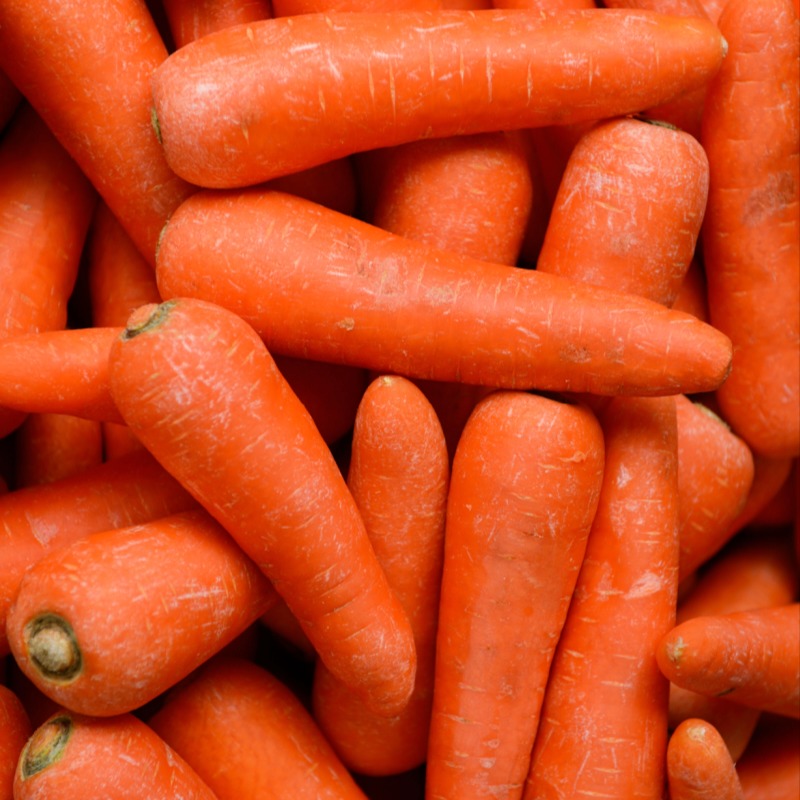
1kg carrots, 500g parsnips, a swede and more
Planning a big roast for Easter? You'll want to hop to it this week to get mega-cheap vegetables. Much like we see at Christmas, some of the major supermarkets are reducing the price of selected packets of veg leading up to Easter.
So far, Aldi, Lidl and Morrisons have dropped the price of carrots, parsnips and a swede down to 4p. Aldi and Lidl are also selling other selected veg at 8p each. Sainsbury's and Tesco have knocked prices down to 15p a packet, while Asda is doing it slightly differently, running a 'five vegetables for £1' offer.
Supermarkets are constantly price matching, so we could see the cost of veg chopped even further, and we'll update here if there are any changes.
Here's the full list of where you can bag a veggie bargain:
Aldi, in stores
Available now until Sunday 5 April
-
4p parsnips (500g) – were 74p, saving 95%
-
4p carrots (1kg) – were 69p, saving 94%
-
4p swede (each) – was 62p, saving 94%
-
8p white potatoes (2kg) – were £1.32, saving 94%
-
8p brown onions (1kg) – were 99p, saving 92%
-
8p 'XL' loose garlic (each) – was 39p, saving 79%
Lidl, in stores
Available now until Saturday 4 April
-
4p parsnips (500g) – were 74p, saving 95%
-
4p swede – was 62p, saving 94%
-
4p carrots (1kg) – were 69p, saving 94%
-
8p white potatoes (2kg) – not usually sold
-
8p 'Deluxe' echalion shallots (300g) – were 99p, saving 92%
-
8p spring onions (bunch) – were 69p, saving 88%
Morrisons*, in stores & online, with More Card membership (free to join*)
Available now until Sunday 5 April
-
4p parsnips (500g)* – were 74p, saving 95%
-
4p carrots (1kg)* – were 69p, saving 94%
-
4p swede (each)* – was 62p, saving 94%
Tesco*, in stores & online, with Clubcard membership (free to join*)
Available now until Monday 6 April
-
15p potatoes (2kg)* – were £1.32, saving 89%
-
15p brown onions (1kg)* – were 99p, saving 85%
-
15p white cabbage* – was 89p, saving 83%
-
15p broccoli* – was 82p, saving 82%
-
15p parsnips (500g)* – were 74p, saving 80%
-
15p carrots (1kg)* – were 69p, saving 78%
-
15p swede* – was 62p, saving 76%
Sainsbury's, in stores & online, with Nectar membership (free to join)
Available now until Sunday 5 April
-
15p white potatoes (2kg) – were £1.32, saving 89%
-
15p savoy cabbage (each) – was 75p, saving 80%
-
15p parsnips (500g) – were 74p, saving 80%
-
15p carrots (1kg) – were 69p, saving 78%
-
15p swede (each) – was 62p, saving 76%
Asda, in stores & online
Available now until Monday 6 April
Any of these five vegetables for £1 (20p each)
-
Mild & sweet spring greens – 84p separately
-
Broccoli – 79p separately
-
Parsnips (500g) – 74p separately
-
Carrots (1kg) – 69p separately
-
Swede – 62p separately
-
White potatoes (2kg) – 30p separately
If you bought the five most expensive vegetables for £1, you'd be saving 73%.
These are great deals, but only buy what you can use to avoid food waste. Make sure you have a plan for how you’ll store or use your vegetables. Rosemary Brotchie, Senior Specialist at the Waste & Resources Action Programme (WRAP) told us:
“While supermarkets selling cheaper vegetables over Easter makes it more affordable to feed bigger groups, it can be tempting to buy more than we need. Make vegetables last longer by storing them in the fridge – in fact, all fresh fruit and vegetables (including potatoes) should be kept refrigerated, apart from onions, bananas and whole pineapples. For vegetables that you may not use before they go off, the freezer is your friend – most fresh veg can be blanched then frozen, keeping it fresh for months to come.”
For full tips, see our 15 ways to stop wasting food and drink blog.
Looking for some culinary inspiration? Or know how you're going to make the most of your cheap veg? Let us know on the MSE Forum.
Includes main, side and a starter/dessert
If you go online to Waitrose, you can grab its Food Lovers’ Dine-in for two for £15 deal until Tuesday 7 July. The offer, which is available for delivery and collection, includes one main, one side, and one starter or dessert. The deal is a saving of up to £4.50 compared to buying each item individually.
Mains 🥘
-
Wagyu Beef Cottage Pie
-
Beef Bourguignon
-
Fish pie
-
Paella
-
Spinach and Ricotta lasagne
Sides 🥦
-
Green vegetable medley
-
Cauliflower and broccoli three cheese gratin
-
Potato Dauphinoise
-
Chips
Starters/Desserts 🥗🍫
-
Arancini balls
-
Prawn cocktails
-
Chocolate pudding
-
Sicilian lemon tarts
Visit our Supermarket coupons page for more ways to save on the weekly shop.
Every day with its loyalty card when you bring your own cup
If you sign up for a myWaitrose loyalty card - you can get a free regular-sized tea or coffee in-store every day from the self-serve machine, when you use your own reusable cup in selected stores. You can choose from americano, cappuccino, latte or tea.
If you haven't got one already, you'll receive your physical myWaitrose loyalty card within five weeks of signing up via the link above. Alternatively, you can download a myWaitrose card via the app (free in the App Store or Google Play).
Simply swipe your card at the till – you can then go and get your free drink using your reusable cup. You need to scan your loyalty card in order to use the machine and redeem your drink.
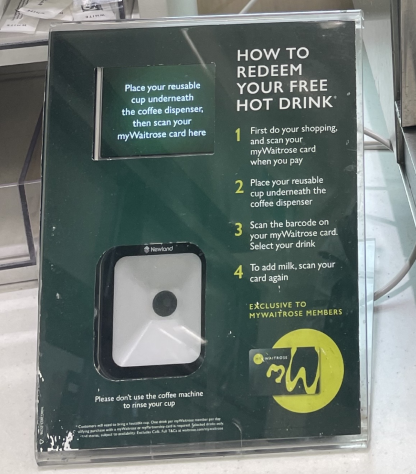
Why do I have to provide my own cup? Waitrose used to hand out disposable coffee cups for this freebie, but in 2018 it stopped this for environmental reasons. For where else you can save with a reusable cup, see our own-cup discounts blog.
More info
It's one free drink per member, per day. Offer excludes hot chocolate, mocha and espresso. It can't be used with other café or hot drink offers, or the café loyalty card.
This offer excludes petrol filling stations, Shell and Welcome Break.
However, can redeem your free drink at the following filling sites with a minimum spend of £40: Hazelmere, Battersea, Bagshot Road, Roehampton, Burgh Heath, Burnt Common, Petts Wood, Ealing, Horley, Kensington Gardens, Broxbourne, Tubs Hill, Headington, Guildford.
Includes a main, side, starter or dessert
If you fancy a pizza, but want to save your dough, this M&S meal deal could be one for you.
Go into an M&S (find your nearest*) and you can pick up its £14 Pizza Night dine-in meal deal which includes two pizzas and two sides. M&S says this'll feed four. This is an on-going offer with no end date. A pizza would usually cost £6 by itself, so with another and two sides, we think this is good value.
What's on the menu?
The M&S website* lists 12 pizzas and 12 sides to to mix and match as you wish (subject to availability). A few highlights we spotted on the menu include:
Pizzas 🍕
-
Margherita
-
Smoked ham and cheese
-
Spicy beef
Sides 🥦
-
Mac and cheese bites
-
Dirty fries
-
Mozzarella sticks
Visit our Supermarket coupons page for ways to save on the weekly shop.

At Asda & Tesco
If you enjoy Baileys Original Irish Cream, you can currently get a one-litre bottle for £14 (normally up to £22) from the following retailers:
-
In stores and online at Tesco*, only when you scan your Clubcard at the checkout, or use it with your online order (remember a minimum order and delivery fee will apply). The discounted price is available until Monday 6 April.
-
In stores and online at Asda (a minimum order and delivery fee will apply if you buy online). There currently isn't an end date to the £14 price, so quick if this is something you're after.
The cheapest we see one-litre bottles of Baileys is £10 around Christmas, but £14 outside of the festive period is a decent deal if you want it now.

Please be Drinkaware.
For Iceland Bonus card holders. In stores only
If you're aged 60 or over, you can get 10% off your shopping at all Iceland (find your nearest*) or The Food Warehouse (find your nearest) stores nationwide, every Tuesday when you show valid ID and an Iceland Bonus card (its loyalty scheme – sign up for free* if you don't have one).
To receive the over-60s discount, simply show proof of age at the checkout – either a driving licence, senior bus pass, senior railcard, or freedom pass (although freedom passes can only be used as ID in London stores). If you’re in Scotland or Wales, you can’t get the discount on alcohol. See full T&Cs*.
When you spend up to £250 in a calendar month
New and existing users of the Lidl Plus app (download via App Store or Google Play) in England, Wales and Scotland will receive a 10% off voucher when spending £250 in a calendar month – up to a maximum of £20. If you spend £100 in a month, Lidl told us you will qualify for a free own-brand item, and then again if you spend £150.
Lidl Plus is also available in Northern Ireland, but tends to have different offers.
As well as money-off coupons, you can claim a free in-store bakery item when you've spent at least £10 in a month. To track the amount spent, scan your virtual Lidl Plus card (within the app) each time you shop. Of course, this shouldn't be an excuse to overspend, but it could be a nice bonus when doing your normal shopping anyway.
Once you've reached the spend target, your coupons should appear automatically in the Coupons section of the app. You can't get change from the coupons, and you'll need to use them within seven days of issue at any Lidl store in the UK (find your nearest).
The qualifying spend excludes infant formula, and coupons can't be used on alcohol or infant formula.

What else you can get from the app – 20% off in-store bakery items and weekly coupons
Check the 'Coupons' section of the Lidl Plus app weekly for extra offers. You can get 20% off all in-store bakery items on Monday to Saturday (excluding bank holidays) from 7pm until closing time.
Every Thursday, you'll be offered a different selection of item-specific coupons valid for one week. When we checked, you could get 20% off cookies and 15% off salted nuts, bacon and stonebaked pizzas.
The Lidl Plus app for Northern Ireland customers
To use the app, select Northern Ireland when signing up. Each week, the app will have 10 coupons for selected products, usually up to 33% off. MoneySaver Glenda K told us she's previously seen 33% off organic honey, 30% off smoked bacon and 25% off ground coffee.
How to use the Lidl Plus app
Scan your virtual card at the till or self-service till each time you shop. Spend coupons by loading them onto your virtual card, then scanning your card before paying. You can use more than one coupon at the same time, but Lidl says there may be a limit of six promotional items per customer.
For more ways to save on the weekly shop, whichever supermarket you frequent, see our supermarket coupons.
Slightly past its best, but still edible. In stores nationwide, excluding Northern Ireland
If you head into a Lidl store (find your nearest), you can pick up a 5kg 'Waste Not' box of fruit and vegetables for £2, while stock lasts. The boxes contain 'edible but not perfect' fruit and veg, which are slightly past its best, but still safe to eat. This is currently an ongoing offer with no end date, but we'll update here if that changes.
These are available in stores in England, Scotland, and Wales, and found near the checkout area. They're subject to availability, so if you want one you'll need to be quick as there are only a limited number of boxes available each day. Lidl says any unsold boxes will be donated to local good causes.
What you'll actually get is completely random, as the boxes are made up on the day with whatever fruit and veg is looking past its best in each store. Some could be damaged or discoloured, but you'll be able to see what you're getting before you buy.

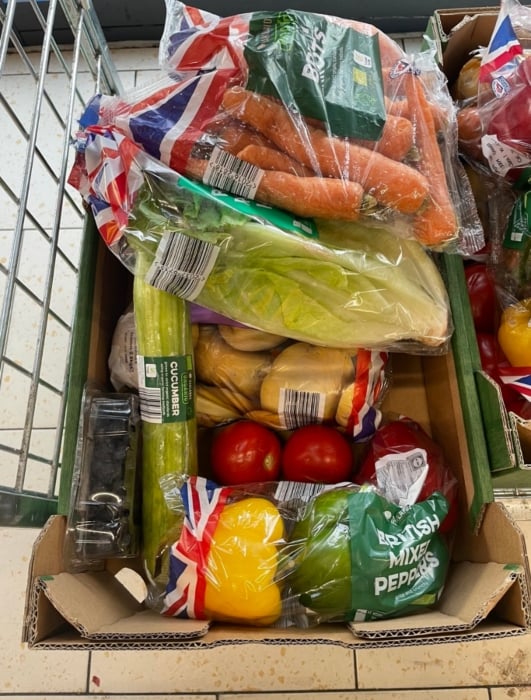
A box we spotted in Aug 2023 in a London branch of Lidl
To give you a rough idea of how much of a saving you could make, when we picked up a box to check this deal out, we got:
-
One 250g punnet of raspberries – normally £2.99
-
Two bananas – normally 37p for two (£0.78/kg)
-
Five apples – normally 89p for a five-pack (17p each)
-
13 satsumas – normally 95p for a 500g bag (£1.90/kg)
-
Two pears – normally 95p for a 550g bag (£1.72/kg)
-
One 500g pack of leeks – normally 69p for a 500g pack (£1.38/kg)
-
Two aubergines – normally 69p each
-
Three lettuce – normally 69p for a two-pack (34p for one)
-
13 potatoes – normally 91p for a 2.5kg bag (36p/kg)
-
One punnet of black grapes – normally £1.09

Based on the price of each individual item in the box, we've calculated that it would cost over £10 to buy it all separately – so buying a box for £2 really does save a bunch.
Don't have a Lidl near you? Try Sainsbury's similar fruit & veg box.
In larger stores only
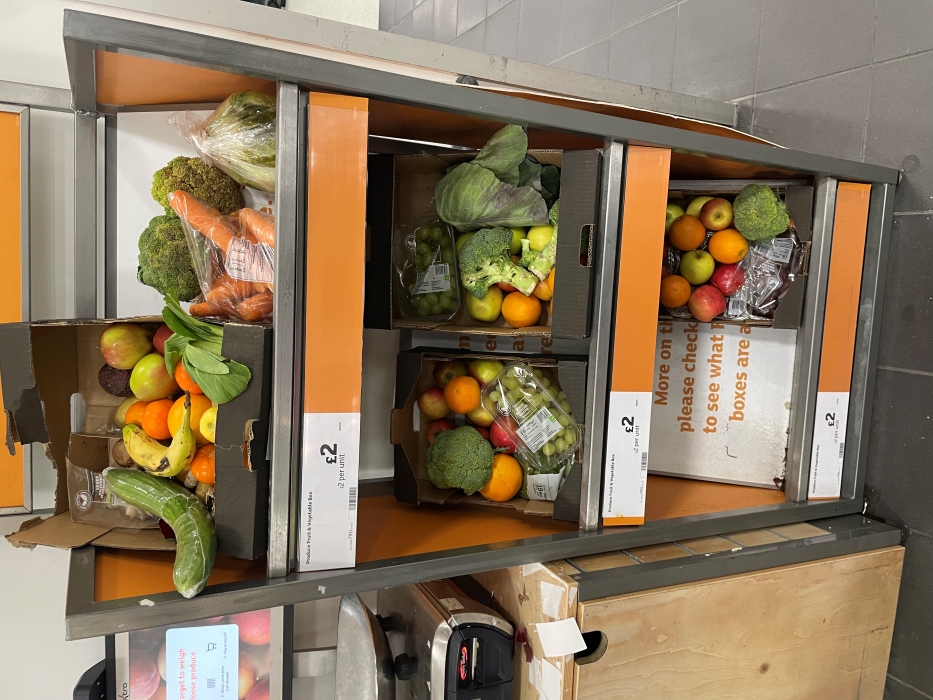
If you're visiting a larger Sainsbury's store (find your nearest), you may be able to pick up a 'Taste Me, Don’t Waste Me’ box of surplus fruit and veg for £2, while stock lasts. The boxes contain fresh fruit and vegetables that would have otherwise gone to waste.
Sainsbury's says the boxes are a permanent feature, though they will be subject to availability. Look out for them in larger stores, rather than Locals (and you can't get them online).
If boxes are available, they'll be in the fresh produce aisle. What you'll get is completely random, though Sainsbury's says typical contents could include: apples, bananas, broccoli, carrots, cauliflower, courgettes, oranges, peppers, plums, red cabbage, and swede.
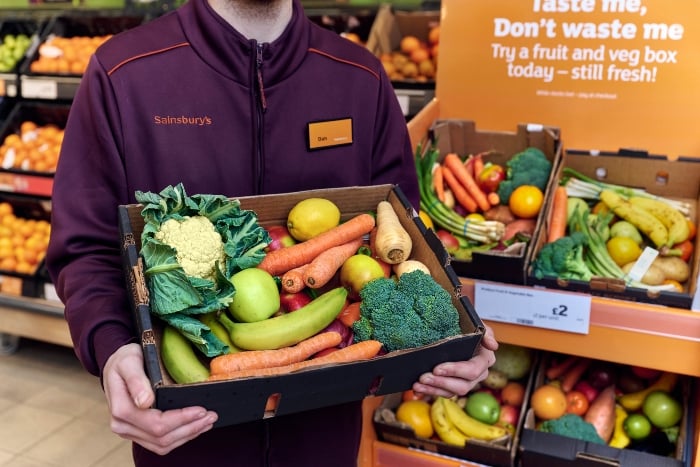
To give you a rough idea of how much of a saving you could make, we've made some calculations based on the products mentioned above:
-
One pack apples (six in pack) – normally 99p (17p each)
-
One pack Fairtrade bananas (five in a pack) – normally 78p (16p each)
-
One loose broccoli – around 72p (depending on weight)
-
One loose cauliflower – normally £1.19
-
One pack courgettes (500g) – normally £1.45
-
Loose orange – normally 30p
-
Loose red pepper – normally 69p
-
One punnet of plums (400g) – normally £1.29
-
Loose red cabbage – normally 75p
-
Loose swede – normally 62p
Based on the price of each individual item in the box, we've calculated it would cost about £9 to buy it all separately – so we reckon buying a box for £2 is a good deal.
Don't live near a Sainsbury's? Try Lidl's similar fruit & veg box.

Often includes potatoes, carrots, peas & more
If you go in-store or online at Morrisons, you can get selected vegetables and fruit branded 'wonky', which may be slightly irregular in shape or appearance, but totally fine to eat.
In most cases, it's the cheapest way to eat fresh at Morrisons, and means it's often priced competitively against other major supermarkets. What's available will depend on the season and stock in your local store.
Product | 'Wonky' price | 'Standard' price | Cheapest alternative |
|---|---|---|---|
Morrisons Wonky Carrots, 1.45kg | 80p | 69p (1kg) | 69p at Sainsbury's |
Morrisons Wonky Peas, 900g | £1.115 | £1.55 (for 1kg) | £1.09 at Sainsbury's |
Morrisons Wonky Pears (min four) | £1.17 | £1.55 | £1.17 at Asda |
Morrisons Wonky Potatoes, 2.5kg | £1.49 | £1.65 | £1.32 at Sainsbury's (for 2kg) & Asda |
The cheapest alternative price is based on online supermarkets – so doesn't include Aldi and Lidl. Prices may differ based on your location.
Be aware that wonky doesn't always mean cheaper. When we checked, you could get a bag of 15 apples for £2.50, but only four 'wonky' apples for £1.19.
Often includes potatoes, carrots, apples & more
If you go in-store or online at Waitrose, you can get selected vegetables and fruit branded 'wonky', which may be slightly irregular in shape or appearance, but totally fine to eat.
What's available will depend on the season and stock in your local store. Here's what we found at one Waitrose store:
Product | 'Wonky' price | 'Standard' price | Cheapest alternative |
|---|---|---|---|
Waitrose Wonky Carrots, 1.5kg | £1 (66p per kg) | 70p (70p per kg) | 69p per kg at Sainsbury's |
Waitrose Wonky Potatoes, 3kg | £1.80 (60p per kg) | £1.80 (72p per kg) | 66p per kg at Asda & Sainsbury's |
Waitrose Wonky Apples, six-pack | £1.75 (29.2p each) | £1.48 (24.7p each) | 99p (17p each) at Sainsbury's |
The cheapest alternative price is based on online supermarkets, so doesn't include Aldi and Lidl. Prices may differ based on your location.
Although Waitrose is rarely the most MoneySaving supermarket, if you're shopping there anyway, its wonky fruit and vegetables are a great option for healthy eating.
How to find more coupons and how to max them

While it is still possible to clip coupons out of a magazine or newspaper, there are now fewer of these coupons available. Like many things, couponing has largely gone digital and most of the savings you can bag these days will be via your phone or online.
There are hundreds of coupons and cashback deals out there, so the info below will help you to find them. However, we regularly update the very best in the supermarket coupons round-up above.
Sign up to loyalty schemes for bonus offers, and some give personalised product discounts
Any true couponer will have a purse, wallet or phone full of stamp cards and loyalty cards/apps. Some give points on your normal shopping which can then be turned into vouchers, and others offer personalised coupons which are usually for items you frequently buy or it thinks you'll be interested in based on your previous purchases.
Some of the best loyalty schemes for coupons and perks:
Up to 30% off items you frequently buy at Sainsbury's. Nectar card-holders using the Sainsbury's SmartShop app can scan items as they shop in-store, and it'll automatically trigger deals of up to 30% off on selected products you regularly buy. If you don't have a smartphone, you can get the offers when you use in-store scanners, and this all on top of normal Nectar perks. However, you can't get these deals when shopping online. Check the Nectar app to see what automatic coupons you've been offered and how long they're valid for – you can use them multiple times before the expiry date. Our Nectar tips & tricks guide has more ways to earn points and boost your stash.
Turn Clubcard points into vouchers to spend at Tesco, or exchange for 2x value for days out and more. You'll get Clubcard statements quarterly, which will change your points to a voucher. You can exchange the vouchers for other rewards, or use them to take their value off your shopping online or in stores. See Reclaim & boost Clubcard vouchers for more info.
Bag Boots Advantage bonus points. Pick up a free magazine in-store monthly, and it may include coupons for money off, but most often it's additional points when you buy a product. Sometimes you'll be able to get a freebie though, so it's worth picking up. You can also get extra points by loading offers from the Boots App to your Boots Advantage card before you shop. Check out our Boots Advantage Card tips & tricks for more info.
The Pets at Home VIP card gets you coupons in the post to spend online or in-store on products your pet likes. You set up the account online, telling it which kind of pet you have, so you won't receive coupons for dog food if your furry friend is feline. These offers are often stackable, and Ex-MSE Rhiannon was previously been sent a code for a free pack of cat treats for her cat's birthday, plus £3 off a £20 spend.
Check for online codes/coupons on selected products at the big supermarkets
Online shopping has become increasingly popular since the start of the coronavirus pandemic so if you're doing an online shop, have a look for codes that can get you money off, or even a freebie.
Sainsbury's frequently offers selected products for free via codes as part of an online shop, which you can find at its little-known Freebies & Competitions page. Some examples over the last year include 'free' £2.85 Tampax, 'free' £2.75 Yeo Valley yogurt, and 'free' £1.65 Dentastix dog treats.
Tesco is another that often gives online coupons on selected products when doing an online shop. Some examples in the last year include £4 off a £12 spend on frozen food such as Birds Eye and Ben & Jerry's, and £5 off a £15 spend on cleaning/laundry items such as Persil and Dettol. We add these when we spot them to our Coupons round-up above.

Iceland online shoppers should also look out for codes on selected products or categories. For example, it's previously offered an online shopping code for free fruit or vegetables (up to £3-worth).
DON'T buy coupons, with the exception of purchasing a product, magazine or newspaper with the coupon inside
There are online auction sites full of photocopied high-value coupons which may have been originally obtained legitimately, but are now being sold as fakes.
You might think you're not hurting anyone by using them, but the best case scenario is you'll be turned away. Worst case scenario? You could be prosecuted for fraud.
Stack coupons with other offers for super savings – works better with physical coupons
'Stacking' is cleverly combining offers, such as a coupon and an in-store deal, to save even more. Not all retailers and coupons allow stacking, and sometimes it's a temporary glitch. The general key to this is to use a manufacturer's coupon alongside an in-store offer or coupon.
Here are some of the ways you can stack coupons to make a bigger saving:
Combine coupons with store sales. It’s all well and good using a 50p off coupon for a £2 product, but if you wait for that same product to go on sale at half-price (£1) and then use the 50p off coupon, you’re only paying 50p and essentially getting 75% off. Each of the major supermarkets have a sale on a specific item on average every two weeks. Most coupons last for a month, so if you hold out for a deal you could save a lot more.
Combine coupons with cashback. If a company is launching a new product it will sometimes offer a coupon for it and also appear in one of the cashback apps we told you about above. Providing both are for the same product, you may be able to use the coupon and get cashback as well, but it's important to check T&Cs as some apps won't always allow you to do this.
Use coupons on yellow-stickered items. The reduced section is where items which are broken, being discontinued or nearing their sell-by date are being sold at a fraction of the price. They'll probably have a sticker on them (usually yellow or orange/white) and there may be a few different reduced sections (especially for refrigerated items). If you can match a coupon to an item here, you could pocket a bargain (providing it is still edible). Check out our guide to yellow stickers.
Popular coupon Q&As

Now you know how to find coupons, check our top tips for using them most effectively so you can maximise your savings. Some of the tips here can involve a bit of planning or be time-consuming, so these might not all be for everyone – but MoneySavers have previously managed to get £50+ shops for pennies, or even be PAID to shop using these methods.
Coupons will all have specific terms and conditions, and while reading T&Cs is never fun, it's important to check them to understand what you can and can't do with a coupon or cashback offer.
As well as using coupons on selected products, see if you can get cashback for your WHOLE shop too
Some cashback sites and credit cards will offer cashback for a specific supermarket for a limited time, so you can get money back on any products you have a coupon or cashback for and a percentage or amount back on the total spend of your shop.
For example, when we checked, Topcashback* was offering up to £8.50 cashback on Sainsbury's online grocery orders over £40 and up to 12% on Iceland online orders. See our Top cashback sites guides.
Some Amex cardholders have previously been able to get 10% cashback on Morrisons spends over £30 and 5% cashback at Waitrose on £20 or more spends.
Go up a brand level if your coupon makes it cheaper than your usual brand
Normally we encourage downshifting – going for a brand level lower than you usually would – in order to save money. But sometimes a higher value coupon can make a more premium brand cheaper than a basic/own-brand.
For example, if your usual basic brand soy milk is 55p a litre, but you've a coupon for £1.50 off a new premium brand that normally costs £1.70/litre then it's worth a go, as you'll only spend 20p after the coupon.
Do you need it? Will you use it? If the answer's no, don't buy it, even with a coupon
Make no mistake... companies don't offer coupons or cashback out of the goodness of their hearts. It's all part of their money-making marketing strategy, with the aim of selling more of an item, often a new product.
Of course, when you're shopping in a supermarket you're usually buying stuff you need, but nevertheless, remember the Money Mantras and don't overspend or get something you don't need just because you have a coupon.
If you think you'll use it or want to try a new version of what you already use, then it could be worth it, however, if you buy it just because you have a coupon and then don't use it, then it's not really saving you money.
Skilled couponers have a number in their head of what's a good price for products they usually buy, so any coupon which brings a new brand or new version down to less than this price dictates what they buy.
Having trouble printing a coupon?
For starters, make sure your printer is on and has enough paper.
If you have a pop-up blocker installed on your web browser, disabling it may help. You may be asked to install a coupon software application before the voucher will print; just follow the instructions to do this. Some anti-virus software will flag up the file but it's not malicious - if you're worried you can always delete it after you've printed the coupons you'd like. Some coupons will allow you to bypass the software download by putting in your mobile number to receive a code.
For more tricks to slash food bills, see our Supermarket shopping tips and How to get free (or cheap) food guides.
Share this guide?